


Setting Timing / ignition (pics inside) HELP!


Thread Starter
Honda-Tech Member
Joined: Sep 2003
Posts: 270
Likes: 1
From: US
 Setting Timing / ignition (pics inside) HELP!
my ITR is being a pain in the ***, i started getting a really bad choking around 3K RPM in all gears, regardless of the driving condition. got that fixed, my timing was 12 BTDC.... i got it set to 16 BTDC...... so that fixed the chocking, drives like a champ, HOWEVER.....
a week after i adjusted my valves, i threw CEL 9, which i believe is "No 1 cylinder position"
i went back under the valve cover, and i notice this....
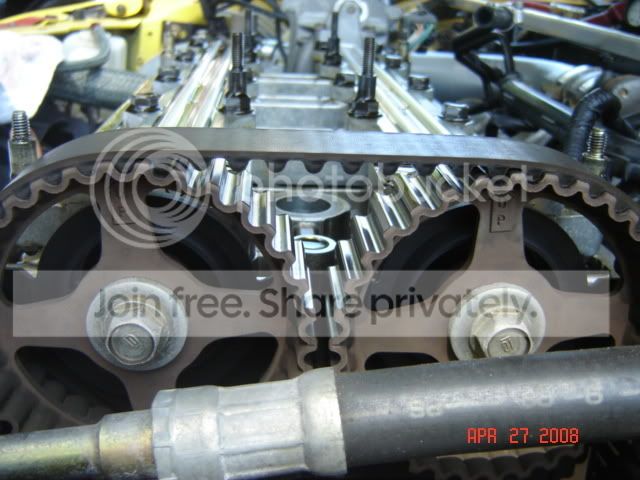
when i set the cams to TDC, my crank doesnt line up.
Cams at No 1
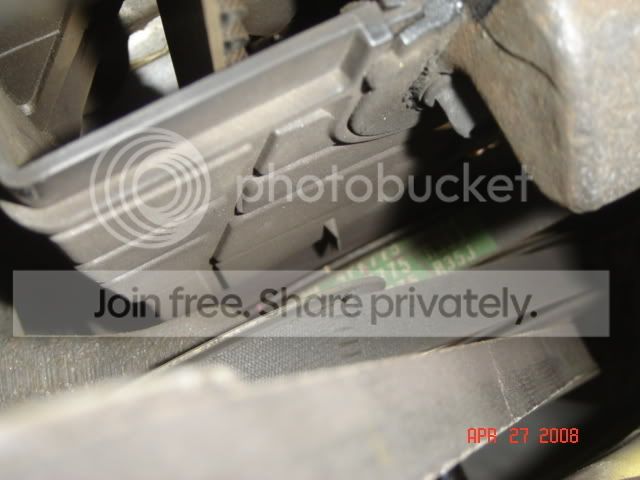
crank pic when cams at No 1
---------------------------
and when i set the crank to TDC
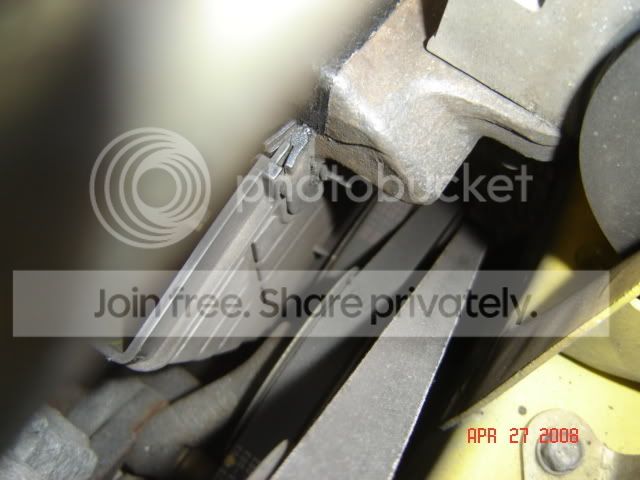
the cams dont line up
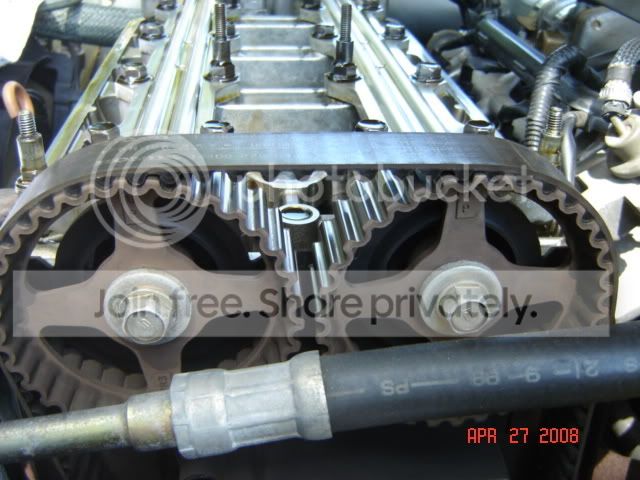
and does this seem to be normal?
No 3
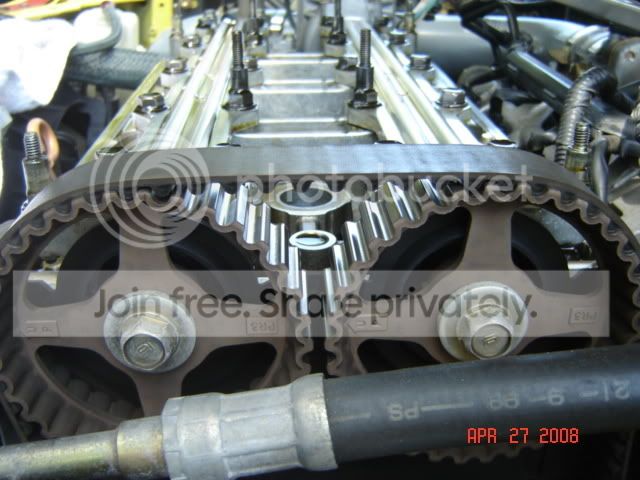
No 4
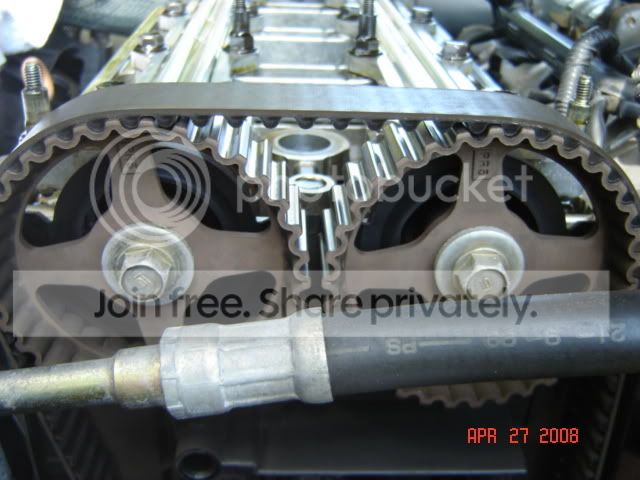
No 2
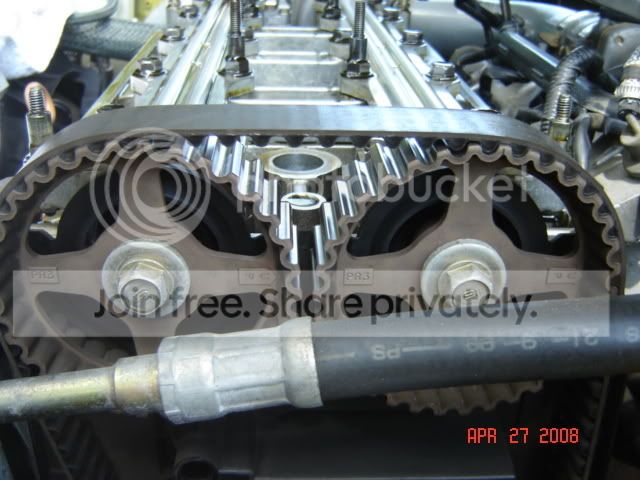
question?
1. is this normal that the crank and cams dont really line up when setting to TDC?
2. are the intake and exhaust cam gears the same?
3. are the other cylinders ( 3, 4, 2) seem to be normal how they line up?
LASTLY
4. HOW CAN I FIX CEL 9????????????
thanks in advance.
Modified by Tiger_Si at 4:13 PM 4/27/2008
a week after i adjusted my valves, i threw CEL 9, which i believe is "No 1 cylinder position"
i went back under the valve cover, and i notice this....
when i set the cams to TDC, my crank doesnt line up.
Cams at No 1
crank pic when cams at No 1
---------------------------
and when i set the crank to TDC
the cams dont line up
and does this seem to be normal?
No 3
No 4
No 2
question?
1. is this normal that the crank and cams dont really line up when setting to TDC?
2. are the intake and exhaust cam gears the same?
3. are the other cylinders ( 3, 4, 2) seem to be normal how they line up?
LASTLY
4. HOW CAN I FIX CEL 9????????????
thanks in advance.
Modified by Tiger_Si at 4:13 PM 4/27/2008

Honda-Tech Member
Joined: Jan 2006
Posts: 788
Likes: 0
From: F Theives, USA
Re: (Tiger_Si)
i agree, i've had another honda with 2 different setups and the timing was right on the mark, but with my itr, this is how it is too, i even tried changing the teeth and this too is the closest i can get.


Trending Topics
Honda-Tech Member
Joined: Jan 2006
Posts: 788
Likes: 0
From: F Theives, USA
Re: (robfrmny21)
<TABLE WIDTH="90%" CELLSPACING=0 CELLPADDING=0 ALIGN=CENTER><TR><TD>Quote, originally posted by robfrmny21 »</TD></TR><TR><TD CLASS="quote">who ever put that belt on put it on wrong</TD></TR></TABLE>
want to elaborate? i'm curious because mine looks like this
want to elaborate? i'm curious because mine looks like this
Thread Starter
Honda-Tech Member
Joined: Sep 2003
Posts: 270
Likes: 1
From: US
Re: (Ultraspeed DC2)
<TABLE WIDTH="90%" CELLSPACING=0 CELLPADDING=0 ALIGN=CENTER><TR><TD>Quote, originally posted by Ultraspeed DC2 »</TD></TR><TR><TD CLASS="quote">
want to elaborate? i'm curious because mine looks like this</TD></TR></TABLE>
2nd that.
also, i should be changing the timing belt soon, but i think i can get another 20K miles on it. i have 80K right now.
I am getting CEL 9. "N0 1 Cylinder position" how do i fix this?????
want to elaborate? i'm curious because mine looks like this</TD></TR></TABLE>
2nd that.
also, i should be changing the timing belt soon, but i think i can get another 20K miles on it. i have 80K right now.
I am getting CEL 9. "N0 1 Cylinder position" how do i fix this?????


Honda-Tech Member
Joined: Aug 2004
Posts: 12,098
Likes: 1
From: blavica
Re: (Tiger_Si)
<TABLE WIDTH="90%" CELLSPACING=0 CELLPADDING=0 ALIGN=CENTER><TR><TD>Quote, originally posted by Tiger_Si »</TD></TR><TR><TD CLASS="quote">
2nd that.
also, i should be changing the timing belt soon, but i think i can get another 20K miles on it. i have 80K right now. </TD></TR></TABLE>
If your there now, why not just replace the belt rather than try to push it?
IMO... that cheap belt can cause a LOT of headache should something bad happen. I'd replace now and see if maybe the current one is stretched a bit. I mean, your going to do it in 20k anyway. /.02
2nd that.
also, i should be changing the timing belt soon, but i think i can get another 20K miles on it. i have 80K right now. </TD></TR></TABLE>
If your there now, why not just replace the belt rather than try to push it?
IMO... that cheap belt can cause a LOT of headache should something bad happen. I'd replace now and see if maybe the current one is stretched a bit. I mean, your going to do it in 20k anyway. /.02

Banned
Joined: Jul 2006
Posts: 2,996
Likes: 0
From: United States of Texas, USA
Re: (Dave_B)
<TABLE WIDTH="90%" CELLSPACING=0 CELLPADDING=0 ALIGN=CENTER><TR><TD>Quote, originally posted by Dave_B »</TD></TR><TR><TD CLASS="quote">
If your there now, why not just replace the belt rather than try to push it?
IMO... that cheap belt can cause a LOT of headache should something bad happen. I'd replace now and see if maybe the current one is stretched a bit. I mean, your going to do it in 20k anyway. /.02</TD></TR></TABLE>
Yup. It's cheap insurance.
If your there now, why not just replace the belt rather than try to push it?
IMO... that cheap belt can cause a LOT of headache should something bad happen. I'd replace now and see if maybe the current one is stretched a bit. I mean, your going to do it in 20k anyway. /.02</TD></TR></TABLE>
Yup. It's cheap insurance.

Honda-Tech Member
Joined: May 2002
Posts: 7,812
Likes: 1
Re: Setting Timing / ignition (migs)
It looks like a simple fix. The following instructions apply if your cams are factory cams. If they aren't, you will need adjustable cam gears.
My analysis. It looks as if somebody made the "UP" marks go up literally, and not perpendicular to the valve cover seat plain.
1) Position crank to TDC.
2) Loosen the tensioner with your 14mm ratchet/socket. This will relieve pressure of the belt. Rotate your intake and exhuast cam gear so that you can drop a bolt or 5mm dowel pin to lock it in place.
3) This will make the intake and exhaust cam TDC too for Cyl #1. Lock Cyl #1 with a 5mm pin or something that will keep it in place.
4) Once all cams are locked into place and your crank is TDC. Re-tension the bolt, this will create the belt to tighten up. Rotate your crank using whatever tool you are using. I usually turn the cam gears a complete revolution and check tightness of tensioning bolt.

My analysis. It looks as if somebody made the "UP" marks go up literally, and not perpendicular to the valve cover seat plain.
1) Position crank to TDC.
2) Loosen the tensioner with your 14mm ratchet/socket. This will relieve pressure of the belt. Rotate your intake and exhuast cam gear so that you can drop a bolt or 5mm dowel pin to lock it in place.
3) This will make the intake and exhaust cam TDC too for Cyl #1. Lock Cyl #1 with a 5mm pin or something that will keep it in place.
4) Once all cams are locked into place and your crank is TDC. Re-tension the bolt, this will create the belt to tighten up. Rotate your crank using whatever tool you are using. I usually turn the cam gears a complete revolution and check tightness of tensioning bolt.

Honda-Tech Member
Joined: Jun 2006
Posts: 1,073
Likes: 0
From: SC, East Coast
Re: (Ultraspeed DC2)
i recently got a code 9 also....i have a 97 spec in my 95 dx....the problem was within the distributor....i believe it happened when my o2 grounded out on my tranny...
anyways the code 9 is a cylinder sensor code which is in the distributor....i always heard it was just better to get a new distributor and then time the car correctly....the code went away after i put a new dizzy on it...remember though when you put the new dizzy on...reset the ecu so you will be able to see if you fixed the problem
anyways the code 9 is a cylinder sensor code which is in the distributor....i always heard it was just better to get a new distributor and then time the car correctly....the code went away after i put a new dizzy on it...remember though when you put the new dizzy on...reset the ecu so you will be able to see if you fixed the problem

Thread Starter
Honda-Tech Member
Joined: Sep 2003
Posts: 270
Likes: 1
From: US
Re: (mister_ej2)
<TABLE WIDTH="90%" CELLSPACING=0 CELLPADDING=0 ALIGN=CENTER><TR><TD>Quote, originally posted by mister_ej2 »</TD></TR><TR><TD CLASS="quote">i recently got a code 9 also....i have a 97 spec in my 95 dx....the problem was within the distributor....i believe it happened when my o2 grounded out on my tranny...
anyways the code 9 is a cylinder sensor code which is in the distributor....i always heard it was just better to get a new distributor and then time the car correctly....the code went away after i put a new dizzy on it...remember though when you put the new dizzy on...reset the ecu so you will be able to see if you fixed the problem</TD></TR></TABLE>
thanks, what do you mean with dizzy????
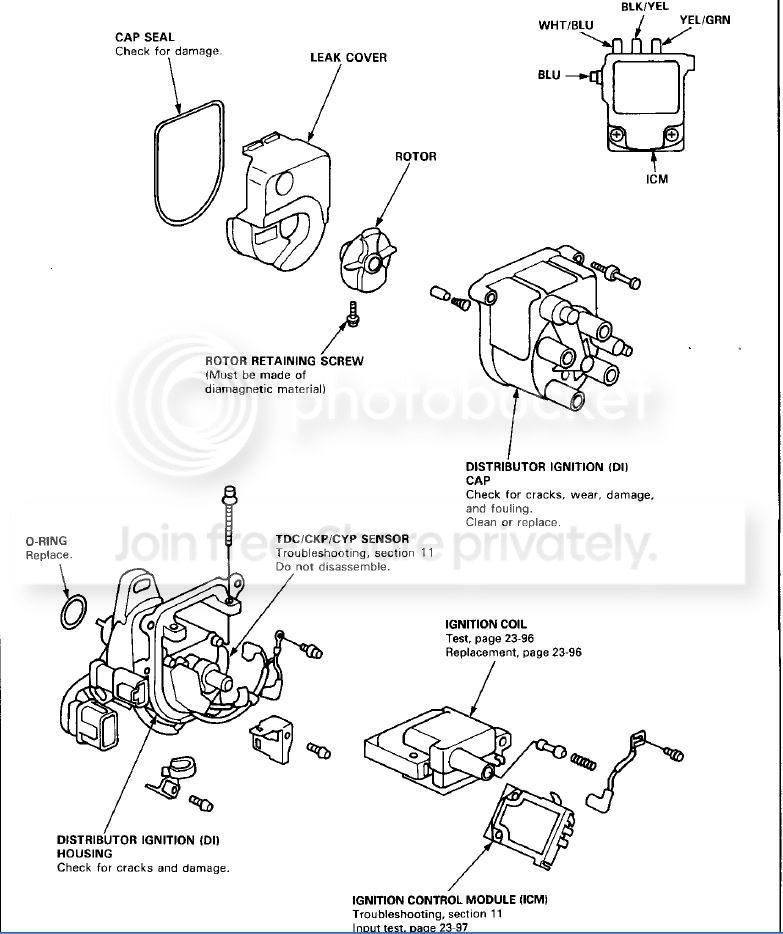
anyways the code 9 is a cylinder sensor code which is in the distributor....i always heard it was just better to get a new distributor and then time the car correctly....the code went away after i put a new dizzy on it...remember though when you put the new dizzy on...reset the ecu so you will be able to see if you fixed the problem</TD></TR></TABLE>
thanks, what do you mean with dizzy????

Member
Joined: Jun 2004
Posts: 4,558
Likes: 0
From: Somewhere in MD, MD, USA
Re: (mister_ej2)
I agree you should change the belt, but your timing per the cam gears and crank look fine to me. I'd drop a long screw driver into cylinder 1 and check that way to be sure. But it would have to be off a lot more than that to cause a obvious issue.
 Re: (totsie7944)
just reset ur timing...on ur crank pulley tdc...leave it off a lil bit so and leave ur cam gears off a tooth or so....when u turn the crank pulley to tighten up ur timing belt it would line up all tdc markings...because if you set everything at tdc before tightening the belt...your timing marks will be off like showed in your first two pics....

Thread
Thread Starter
Forum
Replies
Last Post