


*How To:* JDM RHD DB8 ITR Window Switch into USDM LHD DB Driver Panel

![[Ennis_D]'s Avatar](https://honda-tech.com/forums/customavatars/avatar999395163_2.gif)
Thread Starter
Honda-Tech Member
iTrader: (1)
Joined: Aug 2004
Posts: 4,251
Likes: 0
From: 'Round Here, SC
 *How To:* JDM RHD DB8 ITR Window Switch into USDM LHD DB Driver Panel
Just recently picked up a USDM DB8 from Carlos, aka Formula here on the boards, to whom I give big ups. Car came with JDM RHD DB8 ITR door panels and front panels had window switches. I tried switching the window switches from one side to the other having success with only the, now, passenger side switch. Switching the JDM RHD driver side window switch to the USDM LHD driver side panel causes you to flip the large white plug for the switch over 180deg. which in turn, jumbling all the wiring for the door harness around. After hooking up and blowing ALL 4 20A window fuses, I did some tearing apart to try and figure out a way to be able to use the switch. I took the OEM USDM LHD switch along with the JDM RHD switch all the way down to the boards and discovered that the boards are marked for each pin on the plug. Below you will see that I made some diagrams of the plugs, where they correspond on the board, along with the wire color for each pin. The diagrams have been drawn as if you were looking at the bottom of the switch board, looking directly at the plug and pins:

Above is a diagram of the OEM USDM LHD DB8 driver side window switch. Like stated, illustrated are the pins, locations on the plugs, and the wire colors.

Here you will see the diagram for the JDM RHD DB8 ITR driver side window switch you are trying to change over to the US LHD driver panel. You will see that the plug pin locations are different. Most are a change from one side of the plug to the other but some are completely different. Also notice the plug has been rotated 180deg. in order to plug up to the JDM RHD switch.
In order to depin, or dewire, the large white plug in the door, I simply undone the 4 locks on each side of the plug on the wire side and it opened right up. After that, I took a very small screw driver and pushed the other locks within the plug that holds the wire connectors in place in order to pull the wires out. Once out, I simply went by the second diagram plugging the corresponding wire colors in their new location in the plug.
Once the depin and repin was done, I plugged up all door switches and tried my work. All windows roll down but there is one thing about it: the set of buttons for the driver side are now the buttons for the passenger side ; the set of buttons for the passenger side are now the buttons for the driver side. Also the window lock switch is reversed in its working order. Other than that, all works well.
I wish I would have taken pictures during the process in order to explain more in depth but did not think about that until after the fact. I would like to give a big THANKS to _Justus as he was my assistance in this process. I personally have not seen this topic covered so I felt like I would share my doings. Maybe tomorrow or later on in the week I will take the driver panel back off and show exactly what I am talking about. If you have any questions on this subject, please feel free to pm me and I will do my best to assist you. Thanks guys!
Above is a diagram of the OEM USDM LHD DB8 driver side window switch. Like stated, illustrated are the pins, locations on the plugs, and the wire colors.
Here you will see the diagram for the JDM RHD DB8 ITR driver side window switch you are trying to change over to the US LHD driver panel. You will see that the plug pin locations are different. Most are a change from one side of the plug to the other but some are completely different. Also notice the plug has been rotated 180deg. in order to plug up to the JDM RHD switch.
In order to depin, or dewire, the large white plug in the door, I simply undone the 4 locks on each side of the plug on the wire side and it opened right up. After that, I took a very small screw driver and pushed the other locks within the plug that holds the wire connectors in place in order to pull the wires out. Once out, I simply went by the second diagram plugging the corresponding wire colors in their new location in the plug.
Once the depin and repin was done, I plugged up all door switches and tried my work. All windows roll down but there is one thing about it: the set of buttons for the driver side are now the buttons for the passenger side ; the set of buttons for the passenger side are now the buttons for the driver side. Also the window lock switch is reversed in its working order. Other than that, all works well.
I wish I would have taken pictures during the process in order to explain more in depth but did not think about that until after the fact. I would like to give a big THANKS to _Justus as he was my assistance in this process. I personally have not seen this topic covered so I felt like I would share my doings. Maybe tomorrow or later on in the week I will take the driver panel back off and show exactly what I am talking about. If you have any questions on this subject, please feel free to pm me and I will do my best to assist you. Thanks guys!

 Re: *How To:* JDM RHD DB8 ITR Window Switch into USDM LHD DB Driver Panel ([Ennis_D])
Nice work, but if you have a dremel, you can modify the JDM CF window plate to mount on to of a USDM master switch. This is what I do for the DC2 CF window switches.

Honda-Tech Member
Joined: Aug 2002
Posts: 12,100
Likes: 0
From: Stockton, CA. 209
Re: *How To:* JDM RHD DB8 ITR Window Switch into USDM LHD DB Driver Panel (BlueIntegraBoy)
<TABLE WIDTH="90%" CELLSPACING=0 CELLPADDING=0 ALIGN=CENTER><TR><TD>Quote, originally posted by BlueIntegraBoy »</TD></TR><TR><TD CLASS="quote">Nice work, but if you have a dremel, you can modify the JDM CF window plate to mount on to of a USDM master switch. This is what I do for the DC2 CF window switches.</TD></TR></TABLE>
yea i was gonna say i dont remember it being so hard a few years ago when i installed them.
yea i was gonna say i dont remember it being so hard a few years ago when i installed them.
Thread Starter
Honda-Tech Member
iTrader: (1)
Joined: Aug 2004
Posts: 4,251
Likes: 0
From: 'Round Here, SC
Re: *How To:* JDM RHD DB8 ITR Window Switch into USDM LHD DB Driver Panel (Danger)
<TABLE WIDTH="90%" CELLSPACING=0 CELLPADDING=0 ALIGN=CENTER><TR><TD>Quote, originally posted by BlueIntegraBoy »</TD></TR><TR><TD CLASS="quote">Nice work, but if you have a dremel, you can modify the JDM CF window plate to mount on to of a USDM master switch. This is what I do for the DC2 CF window switches.</TD></TR></TABLE>
I thought about this idea but then thought I rather not ruin the switch in case I ever wanted to get rid of them.
I thought about this idea but then thought I rather not ruin the switch in case I ever wanted to get rid of them.


Trending Topics
Thread Starter
Honda-Tech Member
iTrader: (1)
Joined: Aug 2004
Posts: 4,251
Likes: 0
From: 'Round Here, SC
Re: *How To:* JDM RHD DB8 ITR Window Switch into USDM LHD DB Driver Panel (4DRFTW)
<TABLE WIDTH="90%" CELLSPACING=0 CELLPADDING=0 ALIGN=CENTER><TR><TD>Quote, originally posted by BlueIntegraBoy »</TD></TR><TR><TD CLASS="quote">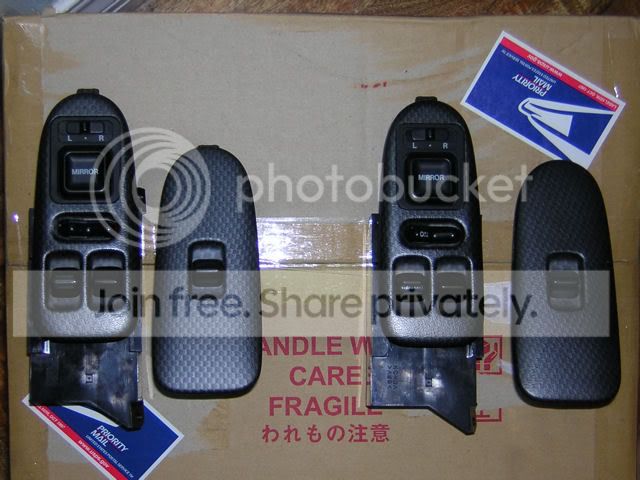
These look great, already modified.</TD></TR></TABLE>
Those are the 2dr Integra R switches.
<TABLE WIDTH="90%" CELLSPACING=0 CELLPADDING=0 ALIGN=CENTER><TR><TD>Quote, originally posted by Formula »</TD></TR><TR><TD CLASS="quote">Nice write up bro! </TD></TR></TABLE>
Preciate you Carlos!
<TABLE WIDTH="90%" CELLSPACING=0 CELLPADDING=0 ALIGN=CENTER><TR><TD>Quote, originally posted by 4DRFTW »</TD></TR><TR><TD CLASS="quote">Thats EXACTLY what i needed thanks for posting that! Huge help</TD></TR></TABLE>
Being of assistance to one person is well enough for me! Thats what I was looking for!
I need to pull the switch out again and switch some wiring I believe. I left the RR and RL wires where they should go for the USDM switch so the rears are backwards. On the JDM switch, the top right switch is the driver front and the bottom right switch is for the passenger rear. The top left switch is for the passenger front and the bottom left is for the driver rear. In the diagram below, for the JDM switch, make sure you move the RRB, RRD, RRU wires across the switch and the RLB, RLD, and RLU the same way. They should be on the opposite sides from how I drew them up I believe.
These look great, already modified.</TD></TR></TABLE>
Those are the 2dr Integra R switches.
<TABLE WIDTH="90%" CELLSPACING=0 CELLPADDING=0 ALIGN=CENTER><TR><TD>Quote, originally posted by Formula »</TD></TR><TR><TD CLASS="quote">Nice write up bro! </TD></TR></TABLE>
Preciate you Carlos!
<TABLE WIDTH="90%" CELLSPACING=0 CELLPADDING=0 ALIGN=CENTER><TR><TD>Quote, originally posted by 4DRFTW »</TD></TR><TR><TD CLASS="quote">Thats EXACTLY what i needed thanks for posting that! Huge help</TD></TR></TABLE>
Being of assistance to one person is well enough for me! Thats what I was looking for!
I need to pull the switch out again and switch some wiring I believe. I left the RR and RL wires where they should go for the USDM switch so the rears are backwards. On the JDM switch, the top right switch is the driver front and the bottom right switch is for the passenger rear. The top left switch is for the passenger front and the bottom left is for the driver rear. In the diagram below, for the JDM switch, make sure you move the RRB, RRD, RRU wires across the switch and the RLB, RLD, and RLU the same way. They should be on the opposite sides from how I drew them up I believe.


Thread
Thread Starter
Forum
Replies
Last Post
rickkane
Honda Civic / Del Sol (1992 - 2000)
1
Dec 26, 2008 02:56 PM
machgo5go
Acura Integra Type-R
5
Mar 6, 2003 05:28 PM
