


hondata s300 used with windows vista


Member
Joined: Apr 2006
Posts: 1,620
Likes: 0
From: Relocating, usa
 Re: hondata s300 used with windows vista (arrojj)
<TABLE WIDTH="90%" CELLSPACING=0 CELLPADDING=0 ALIGN=CENTER><TR><TD>Quote, originally posted by arrojj »</TD></TR><TR><TD CLASS="quote">like it says on top i just got my hondata s300, will i be able to use it with the new windows vista? anyone know, Thanks</TD></TR></TABLE>
My guess would be no. I am an IT professional and it has been my experience that windows Vista has severe compatability issues with just about any and all applications not designed by microsoft. I would check with hondata and see what they have to say. a very good questions though
http://hondata.com
My guess would be no. I am an IT professional and it has been my experience that windows Vista has severe compatability issues with just about any and all applications not designed by microsoft. I would check with hondata and see what they have to say. a very good questions though
http://hondata.com

Thread Starter
Honda-Tech Member
Joined: Jul 2005
Posts: 440
Likes: 0
From: the boot
Re: hondata s300 used with windows vista (B16b-EJ8)
yeah im gonna have to give them a call or something its cuz i want to buy a laptop for that reason to use with my hondata but ill ask best buy if i can have windows xp instead of vista, is that possible?

Junior Member

Joined: Mar 2004
Posts: 104
Likes: 0
Re: hondata s300 used with windows vista (arrojj)
No you can't get a computer from Best Buy with XP still on it. All Best Buy has are Vista computers. I'm an IT professional with over 10 years of experience and I would have to agree with the previous poster that the s300 will probably not work. You would be able to downgrade the OS to XP yourself under the following stipulations.
<TABLE WIDTH="90%" CELLSPACING=0 CELLPADDING=0 ALIGN=CENTER><TR><TD>Quote »</TD></TR><TR><TD CLASS="quote">The OEM versions of Windows Vista Business and Windows Vista Ultimate include downgrade rights to Microsoft Windows XP Professional, Microsoft Windows XP Professional x64 Edition, and Microsoft Windows XP Tablet PC Edition.
No downgrade rights are included in other Windows Vista products licensed in the OEM channel. </TD></TR></TABLE>
The only problem with downgrading at this point though is that many manufacturers don't have drivers out for XP yet so you end up kind of stuck.
Check with Hondata. My guess is that they won't have support for Vista for a while yet.
<TABLE WIDTH="90%" CELLSPACING=0 CELLPADDING=0 ALIGN=CENTER><TR><TD>Quote »</TD></TR><TR><TD CLASS="quote">The OEM versions of Windows Vista Business and Windows Vista Ultimate include downgrade rights to Microsoft Windows XP Professional, Microsoft Windows XP Professional x64 Edition, and Microsoft Windows XP Tablet PC Edition.
No downgrade rights are included in other Windows Vista products licensed in the OEM channel. </TD></TR></TABLE>
The only problem with downgrading at this point though is that many manufacturers don't have drivers out for XP yet so you end up kind of stuck.
Check with Hondata. My guess is that they won't have support for Vista for a while yet.
Thread Starter
Honda-Tech Member
Joined: Jul 2005
Posts: 440
Likes: 0
From: the boot
Re: hondata s300 used with windows vista (JDcompman)
Oh ok i see well i guess ill have to use my friends computer till hondata comes up with something. Well thanks guys for answering my question
Thread Starter
Honda-Tech Member
Joined: Jul 2005
Posts: 440
Likes: 0
From: the boot
Re: hondata s300 used with windows vista (arrojj)
well i called hondata and they told me that the s300 can be used with VISTA just go to the web site and download the newest version. I also emailed them with my question and they sent me this, it shows you how to do it. well i hope this answers anyone asking questions about S300 with windows newest version. 
Installing USB Drivers (Vista)
Previous Top Next
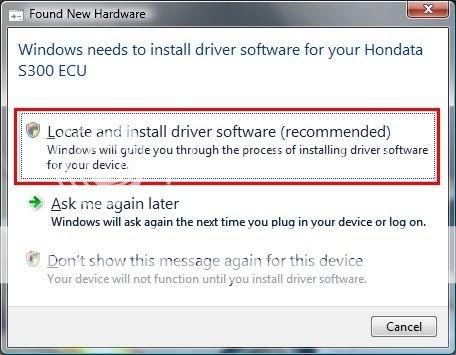
1. Plug the USB cable into the ECU and laptop. The ECU does not need to be in the vehicle at this point. When you plug in the USB cable the following message should be displayed. Click on 'Locate and install driver software'.
2. Vista starts to search for drivers.

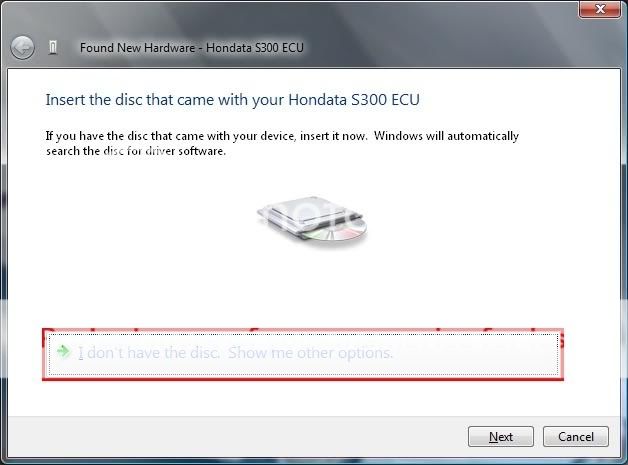
3. Vista requests a location for the drivers. Select 'I don't have the disc' (even if you do).
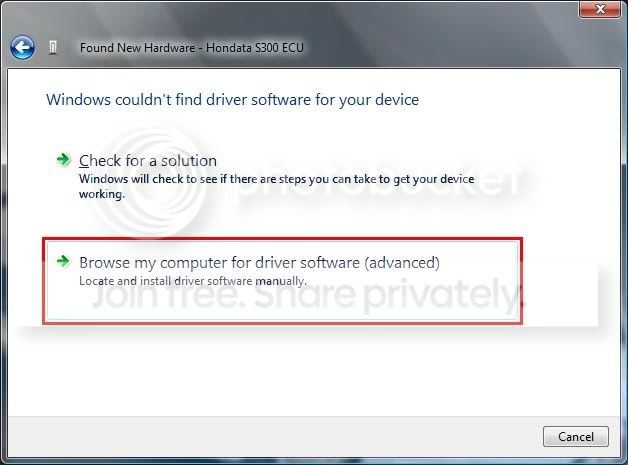
4. Select 'Browse my computer'.
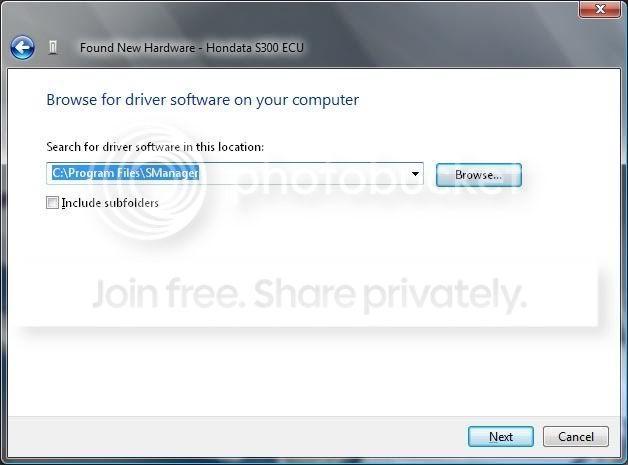
5. Enter the install location of SManager (normally C:\Program Files\SManager).
6. Vista will start to install the drivers.
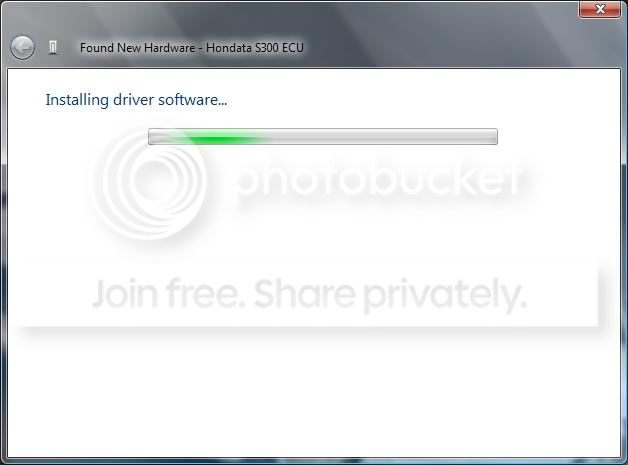
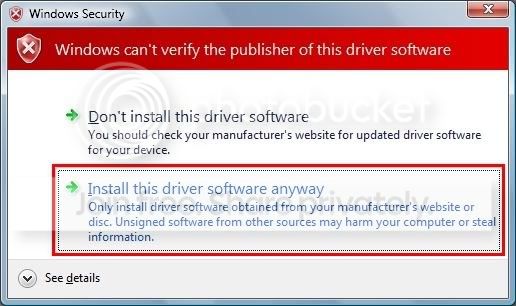
7. Vista may warn (depending on security settings) that the drivers are unsigned. Select 'Install this driver software anyway'.
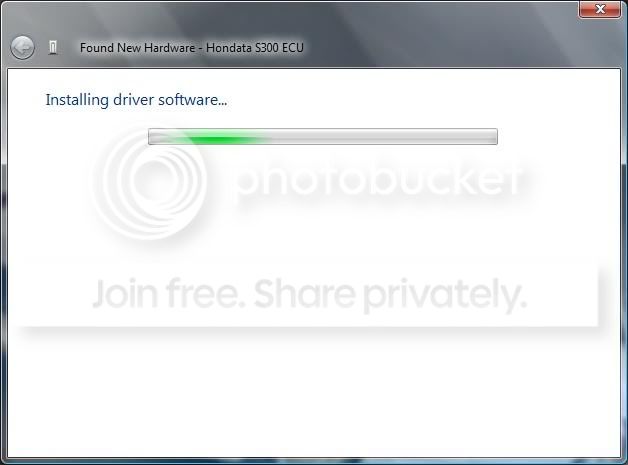
8. The drivers will be installed, and then a message shown to tell you that the drivers have installed. Click on Close.
9. A message is displayed to tell you that the hardware is intalled. Click on Close.
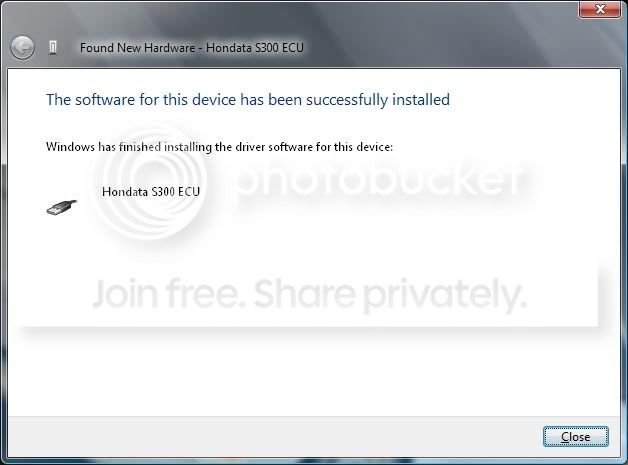
The USB drivers are now installed.
Installing USB Drivers (Vista)
Previous Top Next
1. Plug the USB cable into the ECU and laptop. The ECU does not need to be in the vehicle at this point. When you plug in the USB cable the following message should be displayed. Click on 'Locate and install driver software'.
2. Vista starts to search for drivers.
3. Vista requests a location for the drivers. Select 'I don't have the disc' (even if you do).
4. Select 'Browse my computer'.
5. Enter the install location of SManager (normally C:\Program Files\SManager).
6. Vista will start to install the drivers.
7. Vista may warn (depending on security settings) that the drivers are unsigned. Select 'Install this driver software anyway'.
8. The drivers will be installed, and then a message shown to tell you that the drivers have installed. Click on Close.
9. A message is displayed to tell you that the hardware is intalled. Click on Close.
The USB drivers are now installed.
Junior Member
Joined: Mar 2004
Posts: 104
Likes: 0
Re: hondata s300 used with windows vista (arrojj)
Wow very good to see Hondata is ahead of the game with their software. I commend them for be very proactive, as many other software manufacturers still are working on new versions with Vista support. Thanks for the good info!
Trending Topics
Member
Joined: Apr 2006
Posts: 1,620
Likes: 0
From: Relocating, usa
Re: hondata s300 used with windows vista (JDcompman)
<TABLE WIDTH="90%" CELLSPACING=0 CELLPADDING=0 ALIGN=CENTER><TR><TD>Quote, originally posted by JDcompman »</TD></TR><TR><TD CLASS="quote">Wow very good to see Hondata is ahead of the game with their software. I commend them for be very proactive, as many other software manufacturers still are working on new versions with Vista support. Thanks for the good info!</TD></TR></TABLE>
Agreed 100%
Agreed 100%

Thread
Thread Starter
Forum
Replies
Last Post
