


Possible valve damage


Thread Starter
Honda-Tech Member
Joined: Jun 2016
Posts: 7
Likes: 0
 Possible valve damage
Hello - I wonder if anyone could help me start to diagnose possible valve damage on a 91 Civic DX. While idling at a stop light, the timing belt tensioner broke and the belt shredded. My mechanic put the belt and tensioner back together no problem and it runs, but at high RPM it jerks an feels like it's misfiring.And the gas mileage is about half what it should be. The engine timing seems to be right on. It's throwing several trouble codes, but since this is an "interference" engine, I believe the problem is mechanical - bent or chipped valve or spring maybe, not electronic as indicated by the computer codes. How can I verify that without removing the head? Maybe a compression check or removing the cylinder head cover to observe the upper cylinder workings? Should I check the timing again? I can't really afford any more mechanics. I have tools and the manuals.

Old Fart
Joined: May 2004
Posts: 26,173
Likes: 18
From: kelowna, bc, canada
Re: Possible valve damage
Find another mechanic, he should have pulled the head to check for damage to the valves before replacing the belt.
Although a belt the skips a tooth or two will not damage valve, shredding a belt is pretty much bound to damage/bend valves on an interference engine. 94
Although a belt the skips a tooth or two will not damage valve, shredding a belt is pretty much bound to damage/bend valves on an interference engine. 94

Keyboard Humorist
Joined: May 2002
Posts: 9,814
Likes: 11
From: Granada Hills, Ca, USA
Re: Possible valve damage
Usually, but not always, you get lucky when the belt breaks at low rom just like yours did at idle.
It sounds like you might have the belt on wrong and the mechanical timing is not quite right.
Maybe a tooth off since it's running well until higher rpm.
That's a fairly easy check.
Also, can you tell what the ECU trouble codes are? Could turn out to be something simple like a connector not plugged in or something.
It sounds like you might have the belt on wrong and the mechanical timing is not quite right.
Maybe a tooth off since it's running well until higher rpm.
That's a fairly easy check.
Also, can you tell what the ECU trouble codes are? Could turn out to be something simple like a connector not plugged in or something.
Thread Starter
Honda-Tech Member
Joined: Jun 2016
Posts: 7
Likes: 0
Re: Possible valve damage
Thank you both for the replies
It shows codes for Fuel Injector Circuit, MAP Sensor, Crank Angle and Throttle Angle. The connections are good and the vacuum hoses look tight.
The car was still running, though barely, so I did go another couple hundred feet down the road before I got it to the shoulder. That probably did more damage.
I don't see a red timing mark like the manual says for setting the timing. Is it supposed to be on the big pulley? Maybe it's caked over due to age. Should I remove the timing belt cover to get a better look?
I'm going to take off the valve cover and bump the engine around to look for any obvious damage.
It shows codes for Fuel Injector Circuit, MAP Sensor, Crank Angle and Throttle Angle. The connections are good and the vacuum hoses look tight.
The car was still running, though barely, so I did go another couple hundred feet down the road before I got it to the shoulder. That probably did more damage.
I don't see a red timing mark like the manual says for setting the timing. Is it supposed to be on the big pulley? Maybe it's caked over due to age. Should I remove the timing belt cover to get a better look?
I'm going to take off the valve cover and bump the engine around to look for any obvious damage.

EFB055
Joined: Dec 2005
Posts: 13,249
Likes: 14
From: Brisvegas, QLD, Australia
Re: Possible valve damage
The map sensor and TPS plugs can be switched by accident. But i don't know why they would've been removed for a timing belt change.
MAP wire colours are:
GRN/WHT
WHT
YEL/RED
TPS wire colours are:
GRN/WHT
RED/BLU
YEL/WHT
The red mark should be on the inner lip of the crank pulley. If you can't find it, there's an arrow cast onto the block to align with the pulley that the belt wraps around (on the crank), you'll need to remove the lower cover to see it.
MAP wire colours are:
GRN/WHT
WHT
YEL/RED
TPS wire colours are:
GRN/WHT
RED/BLU
YEL/WHT
The red mark should be on the inner lip of the crank pulley. If you can't find it, there's an arrow cast onto the block to align with the pulley that the belt wraps around (on the crank), you'll need to remove the lower cover to see it.
Thread Starter
Honda-Tech Member
Joined: Jun 2016
Posts: 7
Likes: 0
Re: Possible valve damage
Thanks for your reply. I got the head and the manifolds back on finally. I did not remove the belt all the way, just took off the top timing belt cover and made match marks on the belt and cam shaft sprocket. Here's the rub: I slipped the belt back on, advanced it by three teeth and tightened the tensioner. But when I turned the crankshaft around three more revolutions, the match marks were off by 2 teeth,, then by 4 when I turned it some more. Is the belt slipping? Shouldn't the marks I made be in the same place every time #1 is at TDC?
Trending Topics


 Re: Possible valve damage
No. The belt does not have the same number of teeth as the cam gear. Each time you spin the crank, that mark will move further away.
The only thing that matters is the cams position relative to the crank.
The only thing that matters is the cams position relative to the crank.
Thread Starter
Honda-Tech Member
Joined: Jun 2016
Posts: 7
Likes: 0
Re: Possible valve damage
Thanks for that, I appreciate it.
My other problem before I put it back together is the timing marks on the crankshaft are about and inch past the pointer on the timing belt cover (about an inch closer to the front of the car). Can that be corrected with a timing light and turning the distributor or is it too far out of adjustment? I guess I could adjust it by taking off the belt with the camshaft lined up tdc then turning the crank until the marks align, but a light is probably easier. Just never done it before. Thanks again
My other problem before I put it back together is the timing marks on the crankshaft are about and inch past the pointer on the timing belt cover (about an inch closer to the front of the car). Can that be corrected with a timing light and turning the distributor or is it too far out of adjustment? I guess I could adjust it by taking off the belt with the camshaft lined up tdc then turning the crank until the marks align, but a light is probably easier. Just never done it before. Thanks again
Re: Possible valve damage
The large crank pulley (that the alt & ac belt run on) should have 4 marks on it. One white one all by itself, and then about an inch away 3 close together (white, red, white). The one all by itself should be the Top-Dead-Center mark. This should align with belt-cover-arrow when the cam is at TDC-1. The other 3 marks are the ones you use to adjust ignition timing. They are your ignition window "before top dead center".
This shows the 4 marks (not necessarily your engine though):
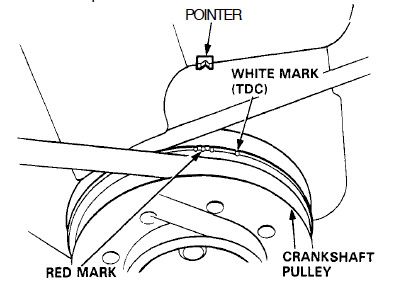
This shows the 4 marks (not necessarily your engine though):
Thread Starter
Honda-Tech Member
Joined: Jun 2016
Posts: 7
Likes: 0
Re: Possible valve damage
OK, thanks. I was using the white mark instead of the red mark to set timing, I should synchronize one of the three notches with the timing light flashing? That puts the timing within spec?
Re: Possible valve damage
Yes, the red center-mark is what you want for ignition timing. The marks just next to it are the min & max setting allowable, so stay within. Also make sure you jump the service-check-connector (see photo) with a small paperclip when setting your timing. Otherwise the ECU will shift the timing electronically as you turn the distributor.

Thread Starter
Honda-Tech Member
Joined: Jun 2016
Posts: 7
Likes: 0
Re: Possible valve damage
So two things need to be set up right for it to run:
1. The solo white mark aligns with the pointer and
2. The camshaft sprocket grooves align with the top of the cylinder head.
The camshaft sprocket is aligned to TDC but it seems the crankshaft is off because the white mark is not aligned with the pointer.
They both have to line up properly to get the mechanical timing correct?
I think it slipped timing when the tensioner broke and no one thought to realign both marks before replacing the belt and tensioner.
Thanks again!
1. The solo white mark aligns with the pointer and
2. The camshaft sprocket grooves align with the top of the cylinder head.
The camshaft sprocket is aligned to TDC but it seems the crankshaft is off because the white mark is not aligned with the pointer.
They both have to line up properly to get the mechanical timing correct?
I think it slipped timing when the tensioner broke and no one thought to realign both marks before replacing the belt and tensioner.
Thanks again!

Thread
Thread Starter
Forum
Replies
Last Post
blykins
Honda Civic / Del Sol (1992 - 2000)
24
Nov 5, 2004 12:22 PM