


Check my timing alignments


Thread Starter
Honda-Tech Member

Joined: Apr 2011
Posts: 804
Likes: 1
From: Chicago
 Check my timing alignments
I just put my timing belt on and I want to make sure the alignments all look right.
the steps I took was:
Cylinder 1 at TDC
Line up timing gear with notch on oil pump
Set the cam gears up ^ at 12 o clock (dots in line)
Wrapped belt around timing gear, then tensioner, then water pump, then exhaust cam then intake cam, then tightened the tensioner. Rotated assembly counter clockwise 6 rotations and re-checked alignments.
I'm going to post some pictures of the alignments, let me know if they look good. Also, how do you know if the tensioner is tight enough? I feel like if I was able to slide the belt on and just tightened it there, wouldn't it be able to just come off?


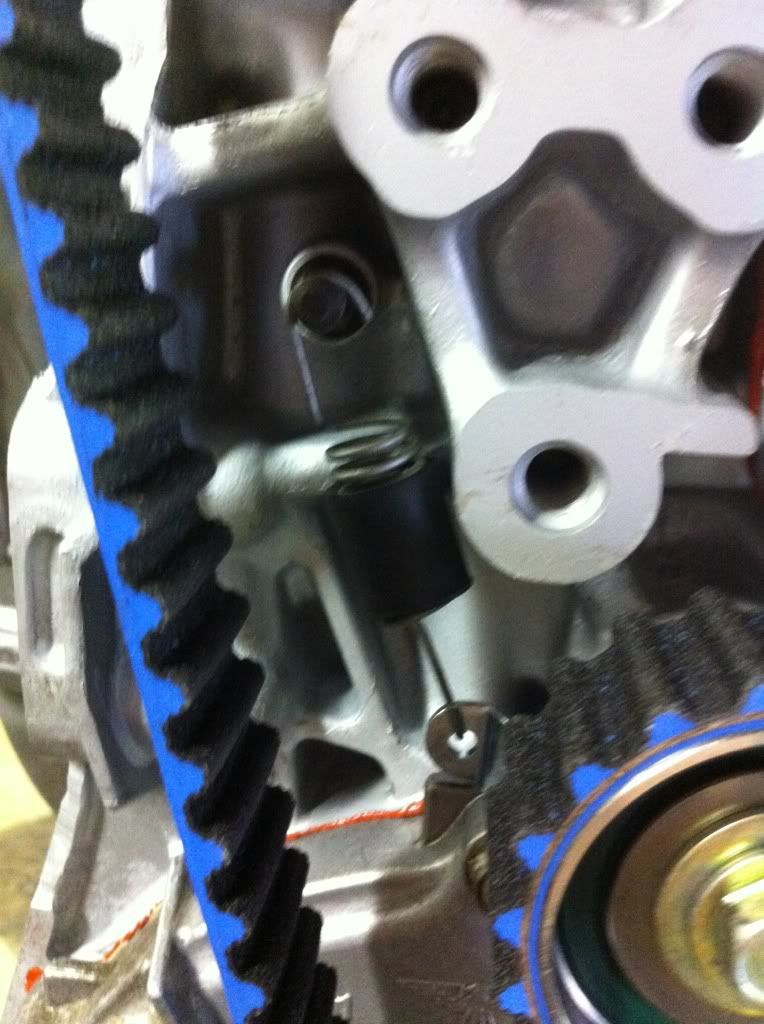


And here is a video of the amount of slack I have on the exhaust side, is this too much?

the steps I took was:
Cylinder 1 at TDC
Line up timing gear with notch on oil pump
Set the cam gears up ^ at 12 o clock (dots in line)
Wrapped belt around timing gear, then tensioner, then water pump, then exhaust cam then intake cam, then tightened the tensioner. Rotated assembly counter clockwise 6 rotations and re-checked alignments.
I'm going to post some pictures of the alignments, let me know if they look good. Also, how do you know if the tensioner is tight enough? I feel like if I was able to slide the belt on and just tightened it there, wouldn't it be able to just come off?
And here is a video of the amount of slack I have on the exhaust side, is this too much?

Honda-Tech Member
Joined: Feb 2011
Posts: 717
Likes: 0
From: New zealand
Re: Check my timing alignments
after you checked it an it's still swt while it's back at t.d.c rotate the crank 3 teeth counterclockwise then undo the tensioner to make tension, if need to pull the tensioner into place to take away the slack, then torque to spec...
as for ^^^ im prety sure your right (im still learnig) but wat i found when i had my belt slack and rotating it even one full rotation the belt would jump teeth. so i tensioned the belt first then cheecked it 6 time's...
hope this help's
as for ^^^ im prety sure your right (im still learnig) but wat i found when i had my belt slack and rotating it even one full rotation the belt would jump teeth. so i tensioned the belt first then cheecked it 6 time's...
hope this help's

Honda-Tech Member
Joined: Aug 2007
Posts: 9,865
Likes: 4
From: Oregon
Re: Check my timing alignments
no, only turn this motor counterclockwise period. rotate 6 times, then at tdc loosen tensioner slightly, just enough that it can move, rotate 3 teeth and you will be able to see the belt get tighter. tighten the tensioner back up and you're good

Honda-Tech Member
Joined: Aug 2007
Posts: 9,865
Likes: 4
From: Oregon
Re: Check my timing alignments
what in the hell are you smoking? once you do 3-6 rotations you then do 3 more?
if you haven't ever done one of these the point of doing 3-6 rotations is to make sure your marks are accurate and you're not off a tooth. the 3 tooth tension process is to remove slack. you can feel it and see it when you tension the belt
if you haven't ever done one of these the point of doing 3-6 rotations is to make sure your marks are accurate and you're not off a tooth. the 3 tooth tension process is to remove slack. you can feel it and see it when you tension the belt
Thread Starter
Honda-Tech Member
Joined: Apr 2011
Posts: 804
Likes: 1
From: Chicago
Re: Check my timing alignments
Okay so I just went and did this:
Loosened the tensioner bolt till I felt it would adjust easily
Rotated counter clockwise 3 teeth (at this point I noticed the exhaust side of the belt become tigther)
Tightened tensioner bolt
It still feels the same though, can you tell from that video I posted if that is excessive or the right amount of slack?
Loosened the tensioner bolt till I felt it would adjust easily
Rotated counter clockwise 3 teeth (at this point I noticed the exhaust side of the belt become tigther)
Tightened tensioner bolt
It still feels the same though, can you tell from that video I posted if that is excessive or the right amount of slack?
Trending Topics

Honda-Tech Member
Joined: Sep 2011
Posts: 1,146
Likes: 3
Re: Check my timing alignments
With a wrench on the crank pulley, and the engine at TDC compression for #1 cylinder, turn the engine THREE TEETH COUNTER-CLOCKWISE, then HOLD IT THERE with your left hand.
Now, with your right hand, push on the belt-run that goes from water pump pulley to intake cam pulley. Can you VERY EASILY push the belt inwards about 3/8" before obvious looseness is removed?
If NO: Then the belt is too tight.
If YES: How much slack is there, exactly?
From your photo, I'm thinking the belt is too tight.
Now, with your right hand, push on the belt-run that goes from water pump pulley to intake cam pulley. Can you VERY EASILY push the belt inwards about 3/8" before obvious looseness is removed?
If NO: Then the belt is too tight.
If YES: How much slack is there, exactly?
From your photo, I'm thinking the belt is too tight.
Honda-Tech Member
Joined: Aug 2007
Posts: 9,865
Likes: 4
From: Oregon
Re: Check my timing alignments
With a wrench on the crank pulley, and the engine at TDC compression for #1 cylinder, turn the engine THREE TEETH COUNTER-CLOCKWISE, then HOLD IT THERE with your left hand.
Now, with your right hand, push on the belt-run that goes from water pump pulley to intake cam pulley. Can you VERY EASILY push the belt inwards about 3/8" before obvious looseness is removed?
If NO: Then the belt is too tight.
If YES: How much slack is there, exactly?
From your photo, I'm thinking the belt is too tight.
Now, with your right hand, push on the belt-run that goes from water pump pulley to intake cam pulley. Can you VERY EASILY push the belt inwards about 3/8" before obvious looseness is removed?
If NO: Then the belt is too tight.
If YES: How much slack is there, exactly?
From your photo, I'm thinking the belt is too tight.
cept i can't really tell on the tight/loose part

Honda-Tech Member
Joined: Aug 2007
Posts: 9,865
Likes: 4
From: Oregon
Re: Check my timing alignments
if you can press in the exhaust cam side about like you did the intake side, probably fine. where people get in trouble is putting extra tension on the belt. if you just let the spring do it's job you really can't overtighten since the amount of force is limited by honda design
Honda-Tech Member
Joined: Sep 2011
Posts: 1,146
Likes: 3
Thread Starter
Honda-Tech Member
Joined: Apr 2011
Posts: 804
Likes: 1
From: Chicago
Thread Starter
Honda-Tech Member
Joined: Apr 2011
Posts: 804
Likes: 1
From: Chicago
Re: Check my timing alignments
Okay I did it just as you said:
Loosened the tensioner
Turned 3 teeth counter clockwise then HELD it there, then tightened the tensioner down.
Here is a video while I was holding the ratchet on the crank

It felt good here, the exhaust side was nice and firm and the intake side was pretty loose. And then once I tightened it and rotated the motor a few times, here's how it turned out:

It seems that once I tighten the tensioner down and rotate the engine the tension of the belt switches sides.
Loosened the tensioner
Turned 3 teeth counter clockwise then HELD it there, then tightened the tensioner down.
Here is a video while I was holding the ratchet on the crank
It felt good here, the exhaust side was nice and firm and the intake side was pretty loose. And then once I tightened it and rotated the motor a few times, here's how it turned out:
It seems that once I tighten the tensioner down and rotate the engine the tension of the belt switches sides.
Thread Starter
Honda-Tech Member
Joined: Apr 2011
Posts: 804
Likes: 1
From: Chicago
Re: Check my timing alignments
And another question, for my cam gears, (lsvtec 10.2:1 CR n/a for now) should I leave the cam gears set in the middle? (not retarded or advanced)
Re: Check my timing alignments
what in the hell are you smoking? once you do 3-6 rotations you then do 3 more?
if you haven't ever done one of these the point of doing 3-6 rotations is to make sure your marks are accurate and you're not off a tooth. the 3 tooth tension process is to remove slack. you can feel it and see it when you tension the belt
if you haven't ever done one of these the point of doing 3-6 rotations is to make sure your marks are accurate and you're not off a tooth. the 3 tooth tension process is to remove slack. you can feel it and see it when you tension the belt
Honda-Tech Member
Joined: Aug 2007
Posts: 9,865
Likes: 4
From: Oregon
Re: Check my timing alignments
unless you shaved metal off the engine or have cams that are ground shitty and require cam gears they are pointless and just run risk of slipping. if you do actually need them then you degree the cams per manf spec.
no clue what your setup is, post it in all motor and see what guys say
no clue what your setup is, post it in all motor and see what guys say
Thread Starter
Honda-Tech Member
Joined: Apr 2011
Posts: 804
Likes: 1
From: Chicago
Re: Check my timing alignments
I'm using them because I heard that lsvtec's will always be slightly off in timing forget the reasoning, and also for when I boost the motor I'd want to be able to adjust it precisely.
Anyways, I did the tensioning about 15 times and I'm getting damn near the same result every time, it has to be right
Anyways, I did the tensioning about 15 times and I'm getting damn near the same result every time, it has to be right

Honda-Tech Member
Joined: Feb 2012
Posts: 85
Likes: 0
From: Bristol, tn
Re: Check my timing alignments
One thing to make sure of is when you installed the belt is make sure that most of the slack was on the tensioner side or intake side and on the eghaust side that way the tensioner can do its job ya know
Honda-Tech Member
Joined: Sep 2011
Posts: 1,146
Likes: 3
Re: Check my timing alignments
Tension will only appear to "switch sides" depending on how the valves are rotating the cam pulleys. The point of the ratchet-and-3-teeth-at-TDC method is to eliminate the obfuscatory effects of the valve springs and camshafts.

Thread
Thread Starter
Forum
Replies
Last Post
sideswiped
Honda Civic / Del Sol (1992 - 2000)
0
Feb 7, 2009 09:48 PM
XkjeldorX
Honda Civic / Del Sol (1992 - 2000)
22
Sep 28, 2007 04:11 AM
SCHYBRID
Forced Induction
1
Apr 5, 2006 05:33 PM
