


Questions about HU...


Thread Starter
Honda-Tech Member
Joined: Sep 2006
Posts: 225
Likes: 0
From: in Texas, originally Puerto Rico!
 Questions about HU...
I noticed in the pics thread some ppl have changed the "welcome" message to something else like "nighthawk r18" (a member here), etc. I would like to know how to do this, since i tried for like half an hour last night pushing buttons here and there and nothing. Thanx in advance... 
Thread Starter
Honda-Tech Member
Joined: Sep 2006
Posts: 225
Likes: 0
From: in Texas, originally Puerto Rico!
Re: Questions about HU... (originalg00kster)


Joined: Nov 2006
Posts: 779
Likes: 0
From: hoffman estates, illinois, usa
Wow.... that *looked* like sarcasm....
Alright bro, this is what you do.... you turn your key to accessory, and turn off your radio, then you push and hold the two ***** on either side of the screen and wait until something happens, don't remember what happens exactly, it's been a while since i did mine.
Alright bro, this is what you do.... you turn your key to accessory, and turn off your radio, then you push and hold the two ***** on either side of the screen and wait until something happens, don't remember what happens exactly, it's been a while since i did mine.

Trending Topics

Honda-Tech Member
Joined: Nov 2005
Posts: 2,168
Likes: 0
From: SoCAL
Re: Questions about HU... (cb7pr)
<TABLE WIDTH="90%" CELLSPACING=0 CELLPADDING=0 ALIGN=CENTER><TR><TD>Quote, originally posted by cb7pr »</TD></TR><TR><TD CLASS="quote">I noticed in the pics thread some ppl have changed the "welcome" message to something else like "nighthawk r18" (a member here), etc. I would like to know how to do this, since i tried for like half an hour last night pushing buttons here and there and nothing. Thanx in advance... </TD></TR></TABLE>
hahaha hey thats me
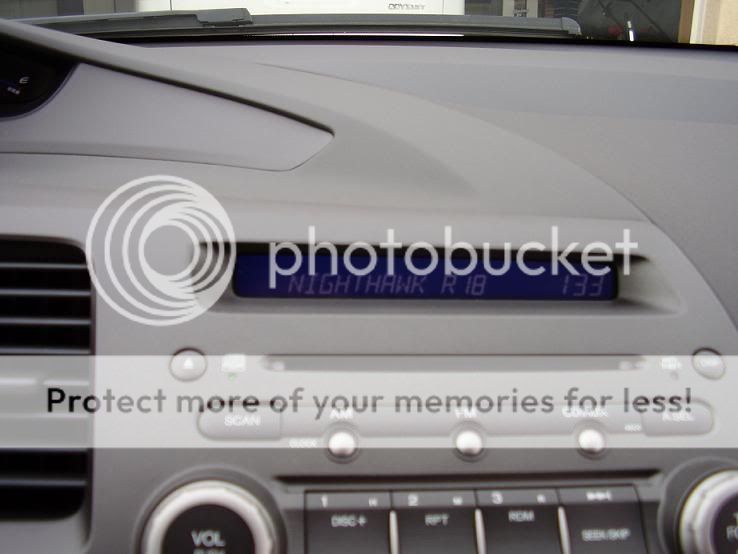
</TD></TR></TABLE>hahaha hey thats me

Honda-Tech Member
Joined: Apr 2005
Posts: 2,380
Likes: 0
From: 1904/772
Re: Questions about HU... (Nighthawk R18)
ohhh that thing..i know what your talking about it now...well you turn your key to the 2nd one...accessory...and have your radio off...hold the tune button down...and then turn on your radio...and the letters should pop up..use the tune to change letters...and foward and previous buttons to move side to side. hope that helps.
hope that helps.


Honda-Tech Member
Joined: Jun 2005
Posts: 337
Likes: 0
From: GlenBurnie, MD, United States
Re: (elklodgeezra)
Ok this isn't the same thing but similar, is there a way to get the radio to say what song is playing? Or is that something our radios can't do? I have a non-navi by the way.

Honda-Tech Member
Joined: Sep 2006
Posts: 510
Likes: 0
From: Seattle, WA, USA
Re: (elklodgeezra)
<TABLE WIDTH="90%" CELLSPACING=0 CELLPADDING=0 ALIGN=CENTER><TR><TD>Quote, originally posted by elklodgeezra »</TD></TR><TR><TD CLASS="quote">Not if you're on the radio radio.... if you're playing a cd, you can hit the display button to the right of the screen until it displays what you want it to.</TD></TR></TABLE>
Actually, mostly only MP3 CDs will display the song. Most pressed CDs don't have the song name as a track, which is what the base stereo pulls to display.
Actually, mostly only MP3 CDs will display the song. Most pressed CDs don't have the song name as a track, which is what the base stereo pulls to display.


Honda-Tech Member
Joined: Sep 2006
Posts: 510
Likes: 0
From: Seattle, WA, USA
Re: (elklodgeezra)
<TABLE WIDTH="90%" CELLSPACING=0 CELLPADDING=0 ALIGN=CENTER><TR><TD>Quote, originally posted by elklodgeezra »</TD></TR><TR><TD CLASS="quote">....I meant the radio as in fm, am stations you can't display songs on the screen.</TD></TR></TABLE>
I knew that, but I was just clarifying your last comment about CD play:
<TABLE WIDTH="90%" CELLSPACING=0 CELLPADDING=0 ALIGN=CENTER><TR><TD>Quote »</TD></TR><TR><TD CLASS="quote">Not if you're on the radio radio.... if you're playing a cd, you can hit the display button to the right of the screen until it displays what you want it to.</TD></TR></TABLE>
Although I do wish FM would transmit song data like XM/Sirius
I knew that, but I was just clarifying your last comment about CD play:
<TABLE WIDTH="90%" CELLSPACING=0 CELLPADDING=0 ALIGN=CENTER><TR><TD>Quote »</TD></TR><TR><TD CLASS="quote">Not if you're on the radio radio.... if you're playing a cd, you can hit the display button to the right of the screen until it displays what you want it to.</TD></TR></TABLE>
Although I do wish FM would transmit song data like XM/Sirius