


Post your blended a.k.a. "see through" shots!


Thread Starter
Honda-Tech Member
Joined: Mar 2002
Posts: 7,506
Likes: 0
From: ATL to SAV to ORL, USA
 Post your blended a.k.a. "see through" shots!
Thanks to Hondizzle! for taking the time to explain how this is done 
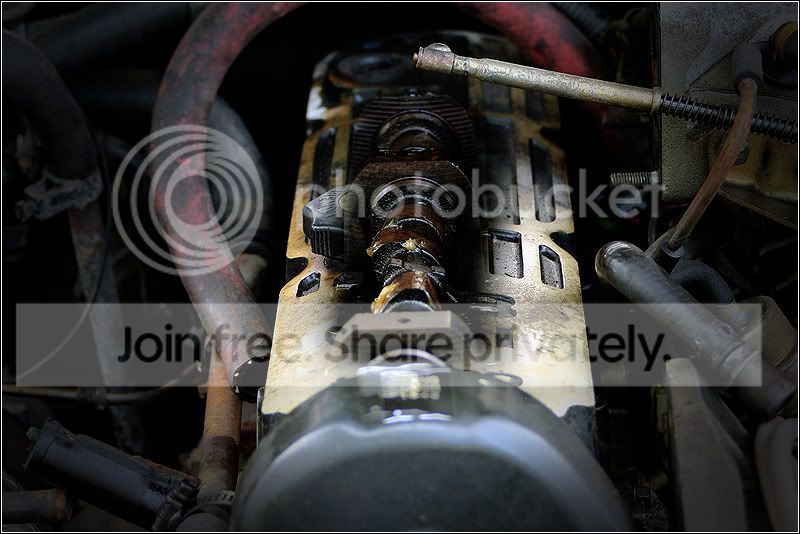
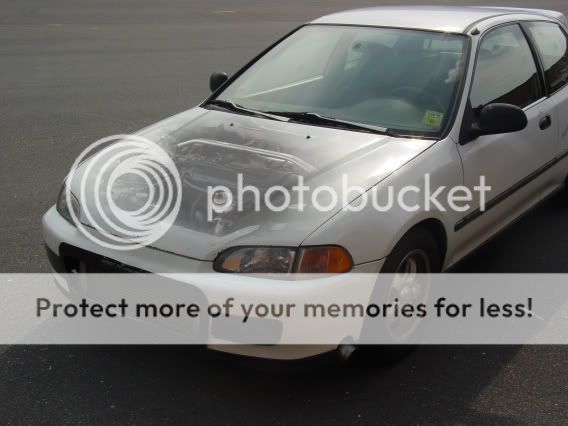
Only shot I have at this time. Definitely going to get more in the next shoot.
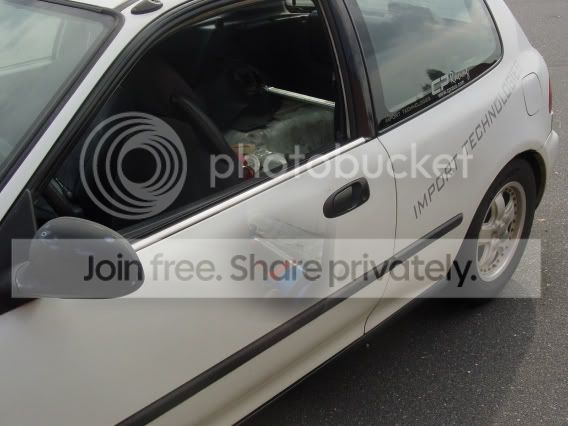
I've seen hood/motor, door/interior, steering wheel/removed.....
Post up those blended shots
My first and only attempt at this time:

If this has already been done, send me a link. I searched everything I could think of and didn't find a thread
Only shot I have at this time. Definitely going to get more in the next shoot.
I've seen hood/motor, door/interior, steering wheel/removed.....
Post up those blended shots
My first and only attempt at this time:
If this has already been done, send me a link. I searched everything I could think of and didn't find a thread





Trending Topics





 Re: (NAallTheWAY)
<TABLE WIDTH="90%" CELLSPACING=0 CELLPADDING=0 ALIGN=CENTER><TR><TD>Quote, originally posted by NAallTheWAY »</TD></TR><TR><TD CLASS="quote">Nice thread. </TD></TR></TABLE>
</TD></TR></TABLE>

Smells like Tuna

Joined: Dec 2003
Posts: 3,813
Likes: 0
From: Illinois where the S is silent stupid.
Re: (EjSex)
<TABLE WIDTH="90%" CELLSPACING=0 CELLPADDING=0 ALIGN=CENTER><TR><TD>Quote, originally posted by EjSex »</TD></TR><TR><TD CLASS="quote">ive read on it before but have forgotten how this is done.. is there a quick write- up anywhere? </TD></TR></TABLE>
quick = tripod camera, take two pics with the item you want to blend moved in one pic, then open both pics ontop of eachother in photoshop, changing the opacity and fill of the picture you want the item to be blended out, erasing everything you dont want to blend.
but dont tell anybody i told you that...its a trade secret.
</TD></TR></TABLE>quick = tripod camera, take two pics with the item you want to blend moved in one pic, then open both pics ontop of eachother in photoshop, changing the opacity and fill of the picture you want the item to be blended out, erasing everything you dont want to blend.
but dont tell anybody i told you that...its a trade secret.

Honda-Tech Member
Joined: Jan 2006
Posts: 4,535
Likes: 0
From: Lancaster, PA
Re: (90JPRCRX)
<TABLE WIDTH="90%" CELLSPACING=0 CELLPADDING=0 ALIGN=CENTER><TR><TD>Quote, originally posted by 90JPRCRX »</TD></TR><TR><TD CLASS="quote">
quick = tripod camera, take two pics with the item you want to blend moved in one pic, then open both pics ontop of eachother in photoshop, changing the opacity and fill of the picture you want the item to be blended out, erasing everything you dont want to blend.
but dont tell anybody i told you that...its a trade secret.</TD></TR></TABLE>
o0 lol, ok, im sworn to secrecy thanks
quick = tripod camera, take two pics with the item you want to blend moved in one pic, then open both pics ontop of eachother in photoshop, changing the opacity and fill of the picture you want the item to be blended out, erasing everything you dont want to blend.
but dont tell anybody i told you that...its a trade secret.</TD></TR></TABLE>
o0 lol, ok, im sworn to secrecy
thanks


Honda-Tech Member
Joined: Apr 2006
Posts: 2,843
Likes: 0
From: San Diego, C.A.
Re: (FreshEG6!*)
<TABLE WIDTH="90%" CELLSPACING=0 CELLPADDING=0 ALIGN=CENTER><TR><TD>Quote, originally posted by FreshEG6!* »</TD></TR><TR><TD CLASS="quote">is there a tutorial on this any where?..</TD></TR></TABLE>
i would like to know too.
i would like to know too.

Honda-Tech Member
Joined: Jun 2003
Posts: 3,031
Likes: 1
From: northwest, WA
Re: (EM1FORLIFE.)
<TABLE WIDTH="90%" CELLSPACING=0 CELLPADDING=0 ALIGN=CENTER><TR><TD>Quote, originally posted by EM1FORLIFE. »</TD></TR><TR><TD CLASS="quote">
i would like to know too.</TD></TR></TABLE>
i would like to know too.</TD></TR></TABLE>

Honda-Tech Member

Joined: Jul 2003
Posts: 9,642
Likes: 6
From: Loose lips sink ships
Re: (FreshEG6!*)
<TABLE WIDTH="90%" CELLSPACING=0 CELLPADDING=0 ALIGN=CENTER><TR><TD>Quote, originally posted by FreshEG6!* »</TD></TR><TR><TD CLASS="quote">is there a tutorial on this any where?..</TD></TR></TABLE>
Shoot me a PM...I can show you the way!
Shoot me a PM...I can show you the way!

Joined: Jul 2003
Posts: 38,620
Likes: 0
From: Baltimore, MD
Re: (777sC)
its not hard at all. if you were doing the hood shot, you would take 2 pics, using a tripod. one with the hood open, and one with it closed. Using an editing program like Photoshop, make each pic a different layer, and blend the area you want to show through.
that prob makes no sense, but thats the closest thing i could do
that prob makes no sense, but thats the closest thing i could do
Thread Starter
Honda-Tech Member
Joined: Mar 2002
Posts: 7,506
Likes: 0
From: ATL to SAV to ORL, USA
Back up for more.....
Q:Any tips how to make the edges blend better  (old pic removed and replaced with better PS'ed pic)
A: Use a softer eraser. I used eraser 300 in the pic below.
My new $8 6500k 13watt bulbs:

Modified by Hybrid93Hatch at 8:27 PM 4/21/2007
(old pic removed and replaced with better PS'ed pic)A: Use a softer eraser. I used eraser 300 in the pic below.
My new $8 6500k 13watt bulbs:
Modified by Hybrid93Hatch at 8:27 PM 4/21/2007