


how do u take off a stud bolt?


Honda-Tech Member
Joined: Mar 2006
Posts: 4,825
Likes: 2
From: Clarksville, TN
 Re: how do u take off a stud bolt? (vermilion)
Are you talking about the caliper mount bolt, where the mount bracket bolts up to the knuckle, or the one from the caliper to its bracket?
What number is it in this picture?

#15 is the bolts that hold the caliper to its bracket. It is on the back side of the caliper.
#19 is the bracket to knuckle bolt
Surely you arent talking about the wheel stud itself, that holds the tire on. #20.
What number is it in this picture?
#15 is the bolts that hold the caliper to its bracket. It is on the back side of the caliper.
#19 is the bracket to knuckle bolt
Surely you arent talking about the wheel stud itself, that holds the tire on. #20.

Honda-Tech Member
Joined: Mar 2006
Posts: 4,825
Likes: 2
From: Clarksville, TN
Re: how do u take off a stud bolt? (vermilion)
Yeah it is. It isnt advisable to beat and bang on it with a hanner.
You will need to use whats called a wheel stud clamp to get it off with. I will try and see if I cant come up with a photo. Its got prongs on one side, king of like a balljoint/ tie rod seperator, and a cupped pusher for the clamp to push the stud out with.
You will need to use whats called a wheel stud clamp to get it off with. I will try and see if I cant come up with a photo. Its got prongs on one side, king of like a balljoint/ tie rod seperator, and a cupped pusher for the clamp to push the stud out with.
Trending Topics

Honda-Tech Member
Joined: Mar 2006
Posts: 4,825
Likes: 2
From: Clarksville, TN
Re: (salomon88)
<TABLE WIDTH="90%" CELLSPACING=0 CELLPADDING=0 ALIGN=CENTER><TR><TD>Quote, originally posted by salomon88 »</TD></TR><TR><TD CLASS="quote">you could try and get 2 nuts that will fit on the stud and put the first one 3/4 down the stung and the second tightly up against it and with a wrench on the back nut spin the stud out</TD></TR></TABLE>
The stud isn't screwed into the hub, it is pressed.
The stud has splines around the outside part of the bottom of the stud. If you try that, and spin it out of the hub, you will only wallow out the bore in the hub. Then, you wont be able to replace the new one.
See what it is I'm talking about?
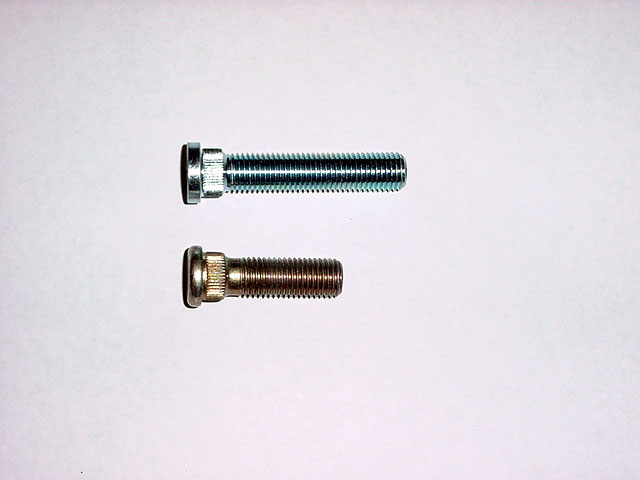
The stud isn't screwed into the hub, it is pressed.
The stud has splines around the outside part of the bottom of the stud. If you try that, and spin it out of the hub, you will only wallow out the bore in the hub. Then, you wont be able to replace the new one.
See what it is I'm talking about?

Thread
Thread Starter
Forum
Replies
Last Post
117
Road Racing / Autocross & Time Attack
16
Apr 2, 2009 10:18 PM
delsolnewkid
Honda Civic / Del Sol (1992 - 2000)
2
Mar 11, 2006 04:12 PM
