what program to use


Thread Starter
Honda-Tech Member
Joined: Sep 2005
Posts: 813
Likes: 0
From: Team5Star.net, Texas
 what program to use
What program should i use to clean up my night shots, here is an example

What should i use to get all of the fuzziness out, and can you post a link of where i can get the program.
Thanks in advance.
-Mike
What should i use to get all of the fuzziness out, and can you post a link of where i can get the program.
Thanks in advance.
-Mike


Thread Starter
Honda-Tech Member
Joined: Sep 2005
Posts: 813
Likes: 0
From: Team5Star.net, Texas
Re: (shyboy817)
<TABLE WIDTH="90%" CELLSPACING=0 CELLPADDING=0 ALIGN=CENTER><TR><TD>Quote, originally posted by shyboy817 »</TD></TR><TR><TD CLASS="quote">New camera, different settings. What kind of camera did you use?</TD></TR></TABLE>
canon powershot sd400
<TABLE WIDTH="90%" CELLSPACING=0 CELLPADDING=0 ALIGN=CENTER><TR><TD>Quote, originally posted by DUFFM4N »</TD></TR><TR><TD CLASS="quote">try taking pictures with some lights, and not in complete darkness</TD></TR></TABLE>
it was the best i could do at the time, just want to see if i could make them better
canon powershot sd400
<TABLE WIDTH="90%" CELLSPACING=0 CELLPADDING=0 ALIGN=CENTER><TR><TD>Quote, originally posted by DUFFM4N »</TD></TR><TR><TD CLASS="quote">try taking pictures with some lights, and not in complete darkness</TD></TR></TABLE>
it was the best i could do at the time, just want to see if i could make them better

Trending Topics

Honda-Tech Member
Joined: Apr 2002
Posts: 15,936
Likes: 0
From: King Tubbys studio, CA
Re: what program to use (krazyteg)
Looks like you shot the photo at 1600ISO, which is why there's so much noise. Also, the shutter only dragged for about 1 second, which wasn't enough time to bring in enough light. If your camera has manual settings, try it again, with the ISO at 100 or 200, and the set the shutter to about 6 or 7 seconds, and see if that helps. If you don't have a tripod, just set the camera on a chair or a box so that it doesn't move.


Thread Starter
Honda-Tech Member
Joined: Sep 2005
Posts: 813
Likes: 0
From: Team5Star.net, Texas
cleaned it up a bit

but i am going to be messing with the settings on my camera some more tomorrow (bare with me i just got it)
Thanks for all the help, well those who helped
btw- i do have a tripod so get off my back
but i am going to be messing with the settings on my camera some more tomorrow (bare with me i just got it)
Thanks for all the help, well those who helped
btw- i do have a tripod so get off my back

Member
Joined: Oct 2004
Posts: 2,761
Likes: 0
From: SO.CAL, California, United States
Re: what program to use (rodrez.)
<TABLE WIDTH="90%" CELLSPACING=0 CELLPADDING=0 ALIGN=CENTER><TR><TD>Quote, originally posted by rodrez. »</TD></TR><TR><TD CLASS="quote">Looks like you shot the photo at 1600ISO, which is why there's so much noise. Also, the shutter only dragged for about 1 second, which wasn't enough time to bring in enough light. If your camera has manual settings, try it again, with the ISO at 100 or 200, and the set the shutter to about 6 or 7 seconds, and see if that helps. If you don't have a tripod, just set the camera on a chair or a box so that it doesn't move. </TD></TR></TABLE>
this guy knows what hes talking about, oh yeah hes the one and only rodrez.
this guy knows what hes talking about, oh yeah hes the one and only rodrez.

Honda-Tech Member
Joined: Sep 2002
Posts: 6,022
Likes: 0
From: tha East Coast
Re: (DUFFM4N)
<TABLE WIDTH="90%" CELLSPACING=0 CELLPADDING=0 ALIGN=CENTER><TR><TD>Quote, originally posted by DUFFM4N »</TD></TR><TR><TD CLASS="quote">try taking pictures with some lights, and not in complete darkness</TD></TR></TABLE>
lol
lol
Thread Starter
Honda-Tech Member
Joined: Sep 2005
Posts: 813
Likes: 0
From: Team5Star.net, Texas
Re: what program to use (jdm y0)
<TABLE WIDTH="90%" CELLSPACING=0 CELLPADDING=0 ALIGN=CENTER><TR><TD>Quote, originally posted by jdm y0 »</TD></TR><TR><TD CLASS="quote">
this guy knows what hes talking about, oh yeah hes the one and only rodrez. </TD></TR></TABLE>
yea im making the changes that he told me too as we speak
this guy knows what hes talking about, oh yeah hes the one and only rodrez.
</TD></TR></TABLE>yea im making the changes that he told me too as we speak



71.192.16.183
Joined: Nov 2004
Posts: 18
Likes: 0
From: Red Sox Nation
Re: (hasback*)
Turn the ISO way down, and turn the exposure way up, and try again.
<TABLE WIDTH="90%" CELLSPACING=0 CELLPADDING=0 ALIGN=CENTER><TR><TD>Quote, originally posted by vc »</TD></TR><TR><TD CLASS="quote">Sorry for stealing the thread but I have a SD550 and I would like to know what are some nice tripods for this camera.</TD></TR></TABLE>
Any tripod should fit pretty much any video camera/photo camera as long as there is a threaded hole on the bottom of the camera, which there is on yours.
<TABLE WIDTH="90%" CELLSPACING=0 CELLPADDING=0 ALIGN=CENTER><TR><TD>Quote, originally posted by vc »</TD></TR><TR><TD CLASS="quote">Sorry for stealing the thread but I have a SD550 and I would like to know what are some nice tripods for this camera.</TD></TR></TABLE>
Any tripod should fit pretty much any video camera/photo camera as long as there is a threaded hole on the bottom of the camera, which there is on yours.
Thread Starter
Honda-Tech Member
Joined: Sep 2005
Posts: 813
Likes: 0
From: Team5Star.net, Texas
Re: (krazyteg)
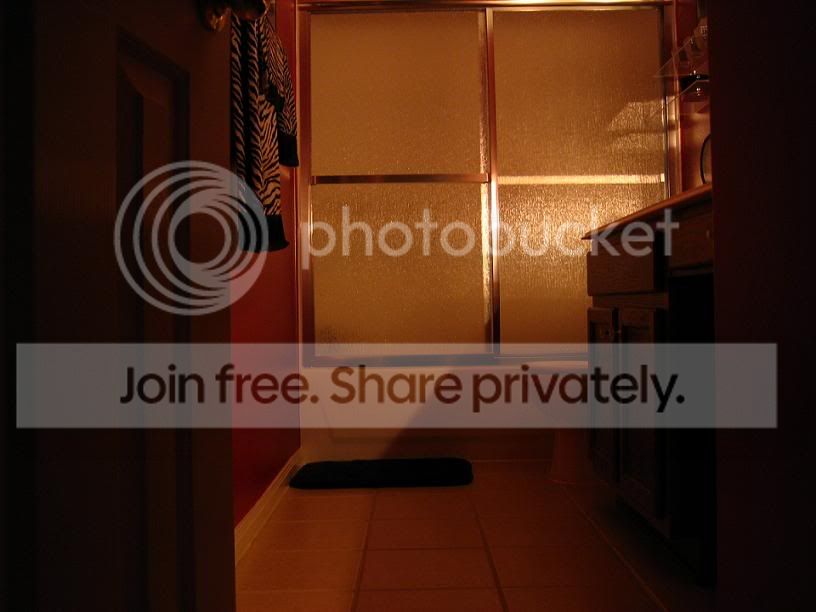
well, here is what i came up with, these are just some random shots in dark rooms/place with ISO at 50 and shutter at 6
This one is in my room with closet light on behind me:

This one is looking into the bathroom with just a little plug in light in the bathroom:
And this last one is in my room with just the computer monitor for light:

How am I looking now??
Thanks for all the help guys
This one is in my room with closet light on behind me:
This one is looking into the bathroom with just a little plug in light in the bathroom:
And this last one is in my room with just the computer monitor for light:
How am I looking now??
Thanks for all the help guys
Honda-Tech Member
Joined: Apr 2002
Posts: 15,936
Likes: 0
From: King Tubbys studio, CA
Re: (krazyteg)
^
There you go. See how there's hardly any noise compared to the first pic you posted? Much much better. Just keep practicing with it, when it's less light, try dragging the shutter even more, maybe 8-9 seconds or more if necessary, and after awhile, you'll get the hang of it, and you'll know how long to set it for based on how much light you have available.
There you go. See how there's hardly any noise compared to the first pic you posted? Much much better. Just keep practicing with it, when it's less light, try dragging the shutter even more, maybe 8-9 seconds or more if necessary, and after awhile, you'll get the hang of it, and you'll know how long to set it for based on how much light you have available.

Honda-Tech Member
Joined: Apr 2003
Posts: 9,051
Likes: 1
From: Bay Area, CA
yeah alot better.
also try not to get too crazy with the jpeg compression, pics as big of those I'd probably keep as big as 100k each
no need to drop them all the way down to 50k,
most ppl have broadband nowadays..
also I like to use a delay on the camera sometimes, if u dont have a tripod, cuz you could jostle the camera alittle bit right when you press the button
also try not to get too crazy with the jpeg compression, pics as big of those I'd probably keep as big as 100k each
no need to drop them all the way down to 50k,
most ppl have broadband nowadays..
also I like to use a delay on the camera sometimes, if u dont have a tripod, cuz you could jostle the camera alittle bit right when you press the button
Thread Starter
Honda-Tech Member
Joined: Sep 2005
Posts: 813
Likes: 0
From: Team5Star.net, Texas
Re: (rodrez.)
<TABLE WIDTH="90%" CELLSPACING=0 CELLPADDING=0 ALIGN=CENTER><TR><TD>Quote, originally posted by rodrez. »</TD></TR><TR><TD CLASS="quote">^
There you go. See how there's hardly any noise compared to the first pic you posted? Much much better. Just keep practicing with it, when it's less light, try dragging the shutter even more, maybe 8-9 seconds or more if necessary, and after awhile, you'll get the hang of it, and you'll know how long to set it for based on how much light you have available. </TD></TR></TABLE>
yea, thanks for all the help it is much appreciated
There you go. See how there's hardly any noise compared to the first pic you posted? Much much better. Just keep practicing with it, when it's less light, try dragging the shutter even more, maybe 8-9 seconds or more if necessary, and after awhile, you'll get the hang of it, and you'll know how long to set it for based on how much light you have available.
</TD></TR></TABLE>yea, thanks for all the help it is much appreciated

Member
Joined: Oct 2004
Posts: 2,761
Likes: 0
From: SO.CAL, California, United States
Re: what program to use (vivid 02)
<TABLE WIDTH="90%" CELLSPACING=0 CELLPADDING=0 ALIGN=CENTER><TR><TD>Quote, originally posted by vivid 02 »</TD></TR><TR><TD CLASS="quote">One of the most informative threads for me here ever Thanks Rodrez and all </TD></TR></TABLE>
</TD></TR></TABLE>