


indash screen + computer/mircosoft windows


Thread Starter
Honda-Tech Member
iTrader: (1)
Joined: Jan 2003
Posts: 22,150
Likes: 0
From: The Village Hidden in the Leaves: Seattle, WA
 indash screen + computer/mircosoft windows
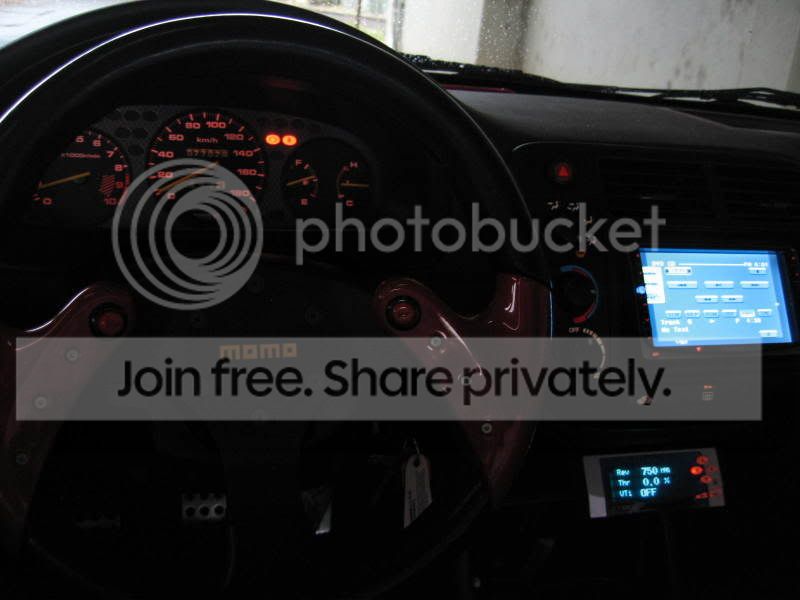
So a friend of mine mentioned a few months ago that someone installed a screen into their double din and had installed windows running on it. i thought it was pretty cool cause then you basically have a computer running in your car. you can save music, videos, games, internet, etc.
hopefully he doesn't mind me sharing:
http://riceonmysock.com/viewto...creen
*i think you'll need to sign up to view.

looks pretty clean in my opinion. it's even touchscreen. he states that he spent about 1500 to build the setup. it's basically a home computer with modified power supplies to operate the computer.

his setup is a bit too bulky for me though. i'm no expert at computer building, but i'm not sure if it can get a computer to be smaller than that.
well, i did some searching through http://www.mp3car.com and found this indash setup:

http://store.mp3car.com/Produc...2D007
looks good. it's an indash setup with the screen sliding out. but obviously the price tag is a bit high (yet i think it's reasonable in comparison to other indash dvd systems on the market).
they also have compact computer setups premade. these have motherboards, cpu's, usb ports, etc

SO, here's my idea. I want to get a double din screen. i like how it looks. almost like the oem CTR navi.
**picture borrowed from another HT member.
I was thinking about getting a touch screen to install in the double din with the climate control (as pictured above) and hooking up one of those premade comps to put in my lower din next to the cup holder. the dimensions of the posted above computer [7"(177.8mm) x 2"(50.8mm) x 10"(254.0mm)] make it so that it'll fit right in....i think. lol
anyways, has anyone attempted to do anything like this? i think it'd be super neat. mp3car.com has small portable keyboards and even has an add-on to read CEL codes

http://store.mp3car.com/Produc...2D013
hopefully he doesn't mind me sharing:
http://riceonmysock.com/viewto...creen
*i think you'll need to sign up to view.
looks pretty clean in my opinion. it's even touchscreen.
he states that he spent about 1500 to build the setup. it's basically a home computer with modified power supplies to operate the computer. his setup is a bit too bulky for me though. i'm no expert at computer building, but i'm not sure if it can get a computer to be smaller than that.
well, i did some searching through http://www.mp3car.com and found this indash setup:
http://store.mp3car.com/Produc...2D007
looks good. it's an indash setup with the screen sliding out. but obviously the price tag is a bit high (yet i think it's reasonable in comparison to other indash dvd systems on the market).
they also have compact computer setups premade. these have motherboards, cpu's, usb ports, etc
SO, here's my idea. I want to get a double din screen. i like how it looks. almost like the oem CTR navi.
**picture borrowed from another HT member.
I was thinking about getting a touch screen to install in the double din with the climate control (as pictured above) and hooking up one of those premade comps to put in my lower din next to the cup holder. the dimensions of the posted above computer [7"(177.8mm) x 2"(50.8mm) x 10"(254.0mm)] make it so that it'll fit right in....i think. lol
anyways, has anyone attempted to do anything like this? i think it'd be super neat. mp3car.com has small portable keyboards and even has an add-on to read CEL codes
http://store.mp3car.com/Produc...2D013
Thread Starter
Honda-Tech Member
iTrader: (1)
Joined: Jan 2003
Posts: 22,150
Likes: 0
From: The Village Hidden in the Leaves: Seattle, WA
oh yeah, here is a computer that was built and installed behind a wheel. pretty cool i think. you could probably have it as a spare tire and no one would ever know!
http://www.bit-tech.net/moddin....html
frontal:

back:

http://www.bit-tech.net/moddin....html
frontal:
back:

Thread Starter
Honda-Tech Member
iTrader: (1)
Joined: Jan 2003
Posts: 22,150
Likes: 0
From: The Village Hidden in the Leaves: Seattle, WA
the harddrive is underneath the motherboard pictured above.

the power supply for the wheel is this:

it's a picoPSU. "the world's smallest power supply"
but i'm not trying to do the wheel idea, just thought it was cool
the whole build is in the link above.
the power supply for the wheel is this:
it's a picoPSU. "the world's smallest power supply"
but i'm not trying to do the wheel idea, just thought it was cool
the whole build is in the link above.

Member
Joined: Dec 2005
Posts: 1,137
Likes: 0
From: NY, USA
Re: (undercoverdc2)
Small form pcs exist - just buy a micro atx board, a 12v to 12v ps, and a hd
its a great idea, and has been done multiple times..
also you don't need constant access to your mini-pc, you can easily just mount it in the trunk - cause once you load up everything you never need to touch the actual pc again.
There was another thread on this b4: https://honda-tech.com/zerothread/1787731
he is also using the micro pc u listed...
--------------------------------------
i think it might just be easier for you to buy a mac mini - and hook that up in your car...
or maybe the new slim intel pcs by samsung...
the technology is out there, all you have to do is the custom work
its a great idea, and has been done multiple times..
also you don't need constant access to your mini-pc, you can easily just mount it in the trunk - cause once you load up everything you never need to touch the actual pc again.
There was another thread on this b4: https://honda-tech.com/zerothread/1787731
he is also using the micro pc u listed...
--------------------------------------
i think it might just be easier for you to buy a mac mini - and hook that up in your car...
or maybe the new slim intel pcs by samsung...
the technology is out there, all you have to do is the custom work
Thread Starter
Honda-Tech Member
iTrader: (1)
Joined: Jan 2003
Posts: 22,150
Likes: 0
From: The Village Hidden in the Leaves: Seattle, WA
yeah, i thought it'd be cool to have access to it just in case i want to play a cd that i just got from a friend or maybe like swap movies if i'm on a road trip. it would be more convient.
Trending Topics


Thread Starter
Honda-Tech Member
iTrader: (1)
Joined: Jan 2003
Posts: 22,150
Likes: 0
From: The Village Hidden in the Leaves: Seattle, WA
Re: (shyboy817)
<TABLE WIDTH="90%" CELLSPACING=0 CELLPADDING=0 ALIGN=CENTER><TR><TD>Quote, originally posted by shyboy817 »</TD></TR><TR><TD CLASS="quote">I don't get what the purpose to install a computer behind a wheel. They did a good job doing it, but seems pretty pointless.</TD></TR></TABLE>
it's like an indash, but only better. systems that are sold by more stores are limited to dvd's, mp3's, audio cd's, and navigation. if you can put on windows, then you can store music into a harddrive and not have to burn cd's. and if you get a wireless card for it, you can jump onto people's wireless systems in neighborhoods to get online. haha
and as i mentioned, you could get that obd reader to get CEL codes too. i bet you could even doing tuning, except the screen is a bit small. haha
it's like an indash, but only better. systems that are sold by more stores are limited to dvd's, mp3's, audio cd's, and navigation. if you can put on windows, then you can store music into a harddrive and not have to burn cd's. and if you get a wireless card for it, you can jump onto people's wireless systems in neighborhoods to get online. haha
and as i mentioned, you could get that obd reader to get CEL codes too. i bet you could even doing tuning, except the screen is a bit small. haha
Member
Joined: Dec 2005
Posts: 1,137
Likes: 0
From: NY, USA
Re: (undercoverdc2)
<TABLE WIDTH="90%" CELLSPACING=0 CELLPADDING=0 ALIGN=CENTER><TR><TD>Quote, originally posted by undercoverdc2 »</TD></TR><TR><TD CLASS="quote">yeah, i thought it'd be cool to have access to it just in case i want to play a cd that i just got from a friend or maybe like swap movies if i'm on a road trip. it would be more convient. </TD></TR></TABLE>
First of all, you still need a head unit, cause that would be the main media center - the computer is just an add on for media stored on the hd.
i like alpine: http://www.alpine-usa.com/en/p...-9861
cause the head unit process the audio signal and then either amplifies it or sends it to the amps in the car. it also acts as an a/v switch
YOU SHOULD NOT connect the computer's output directly to the amp - even though you could, but i wouldn't do that - not enough control and car amps aren't made to be hooked up to a computer's soundcard out.
so, that is why the computer is in the trunk.
----------
<TABLE WIDTH="90%" CELLSPACING=0 CELLPADDING=0 ALIGN=CENTER><TR><TD>Quote, originally posted by shyboy817 »</TD></TR><TR><TD CLASS="quote">I don't get what the purpose to install a computer behind a wheel. They did a good job doing it, but seems pretty pointless.</TD></TR></TABLE>
that is just some custom computer builder showing off what he can do.
its just a desktop pc, but all you see is a wheel
ever seen a computer built inside the actual winXP box??
or how about the ET doll computer?
computer customization and car customization, its the same ****.. like why do you put a cf hood on your car, or a body kit? or a turbo? same stuff for computers, why is your case clear, why does it have blue leds, why is it liquid cooled, why did you put 2gig of ram, etc..
Modified by bpr0422 at 8:23 AM 11/7/2006
</TD></TR></TABLE>First of all, you still need a head unit, cause that would be the main media center - the computer is just an add on for media stored on the hd.
i like alpine: http://www.alpine-usa.com/en/p...-9861
cause the head unit process the audio signal and then either amplifies it or sends it to the amps in the car. it also acts as an a/v switch
YOU SHOULD NOT connect the computer's output directly to the amp - even though you could, but i wouldn't do that - not enough control and car amps aren't made to be hooked up to a computer's soundcard out.
so, that is why the computer is in the trunk.
----------
<TABLE WIDTH="90%" CELLSPACING=0 CELLPADDING=0 ALIGN=CENTER><TR><TD>Quote, originally posted by shyboy817 »</TD></TR><TR><TD CLASS="quote">I don't get what the purpose to install a computer behind a wheel. They did a good job doing it, but seems pretty pointless.</TD></TR></TABLE>
that is just some custom computer builder showing off what he can do.
its just a desktop pc, but all you see is a wheel
ever seen a computer built inside the actual winXP box??
or how about the ET doll computer?
computer customization and car customization, its the same ****.. like why do you put a cf hood on your car, or a body kit? or a turbo? same stuff for computers, why is your case clear, why does it have blue leds, why is it liquid cooled, why did you put 2gig of ram, etc..
Modified by bpr0422 at 8:23 AM 11/7/2006

Thread
Thread Starter
Forum
Replies
Last Post