


Help me street tune my b18c!!


Thread Starter
Honda-Tech Member
Joined: Oct 2006
Posts: 1,376
Likes: 0
 Help me street tune my b18c!!
im running a jdm p72 chipped on crome with the ostrich emulator and i took a crack at tunning my idle the other day (first time)and got no where! i also have an innovate LM1 im using and it tells me @ idle im arounf 17 afr after the car was warmed up, so i opened crome, removed checsum routine, and enabled realtime programming and started increasing fuel in columns 1&2 (500-750 rpms) but wasnt really getting much change. at least nothing really noticeable and i didnt want to go crazy adding uber fuel....what am i dooing wrong? BTW im running a stock usdm p72 base but my motor is a jdm gsr with i/h/2.5'' ex. if anybody can give me a step by step on getting started with crome (free version) i would greatly appreciate it. also, timing was untouched. 


Honda-Tech Member
Joined: Jun 2005
Posts: 616
Likes: 0
From: Torrance, CA
Re: Help me street tune my b18c!! (I CRX I)
Ok buddy here it is in five steps. I bet you forgot step number 2.
Step zero. have the ostrich hooked up to the ecu and the laptop. Also have the key in the OFF <U></U> position. Do not attempt to turn the key on or start the car until after step five and you should be fine.
Step one. After you open your base rom you need to disable the checksum routine
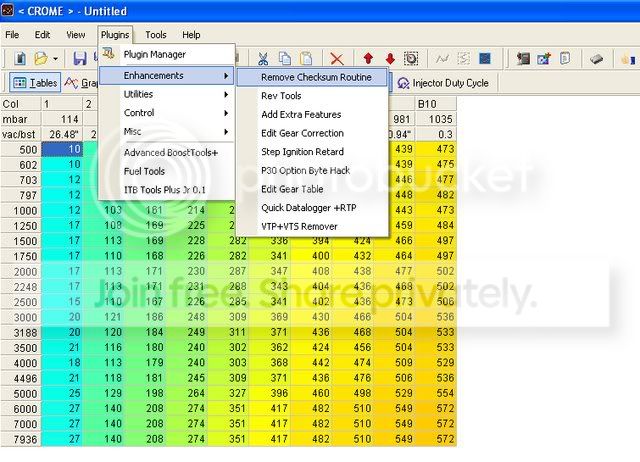
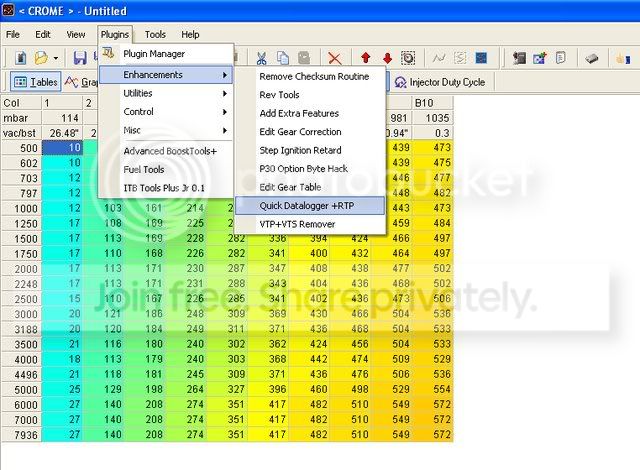
Step two. You need to add the quickdatalogger + RTP (real time programming) plugin
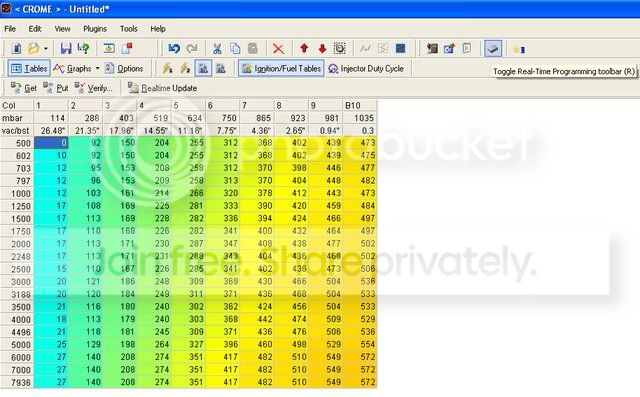
Step three. Click on the realtime programming "chip" picture.
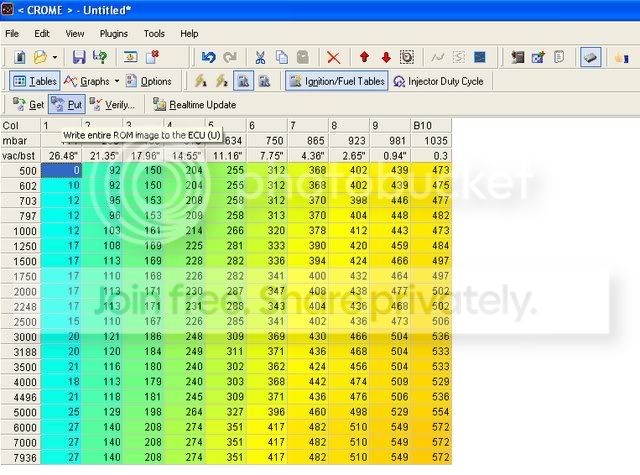
Step four. Click "putt" to send the new rom to the ostrich.
Step five. Click the "realtime update" button.
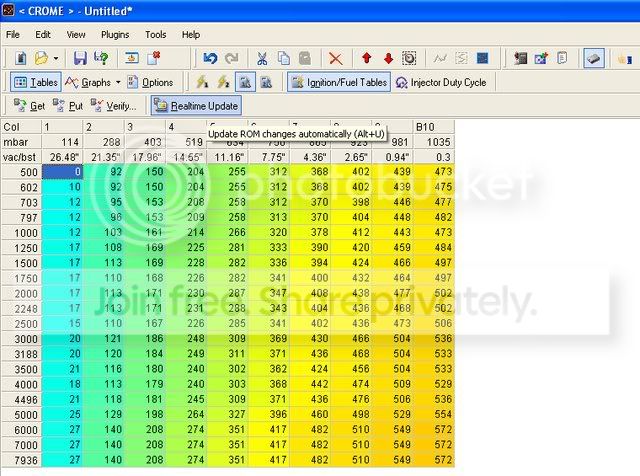
After completing these five steps you should be able to start the car and tune your car in real time using an ostrich and any version of crome.
Ok... here is a little secret. You can tell the realtime emulation is working because every time you make a change to the rom a counter in the lower right hand part of the screen counts down the bites being transfered. Now this happens really fast and tends to just look like a little black flash but it is there. If you highlight the entire low cam fuel rom and then hold down control and tap the up arrow one time it will be a big enough change to actually see the counter. I do this everytime I tune a car to check and make sure the realtime emulation is working properly.
Let us know if this works out for you.
Step zero. have the ostrich hooked up to the ecu and the laptop. Also have the key in the OFF <U></U> position. Do not attempt to turn the key on or start the car until after step five and you should be fine.
Step one. After you open your base rom you need to disable the checksum routine
Step two. You need to add the quickdatalogger + RTP (real time programming) plugin
Step three. Click on the realtime programming "chip" picture.
Step four. Click "putt" to send the new rom to the ostrich.
Step five. Click the "realtime update" button.
After completing these five steps you should be able to start the car and tune your car in real time using an ostrich and any version of crome.
Ok... here is a little secret. You can tell the realtime emulation is working because every time you make a change to the rom a counter in the lower right hand part of the screen counts down the bites being transfered. Now this happens really fast and tends to just look like a little black flash but it is there. If you highlight the entire low cam fuel rom and then hold down control and tap the up arrow one time it will be a big enough change to actually see the counter. I do this everytime I tune a car to check and make sure the realtime emulation is working properly.
Let us know if this works out for you.


Trending Topics
Honda-Tech Member
Joined: Jun 2005
Posts: 616
Likes: 0
From: Torrance, CA
Re: (I CRX I)
shoot for low 13's afr at wot. tune the rest of the map to about 14.0-15.0 when its warmed up and you should be pretty well off.
BTW.
you can put me in your vouches on your sig if you feel I deserve it
BTW.
you can put me in your vouches on your sig if you feel I deserve it
Thread Starter
Honda-Tech Member
Joined: Oct 2006
Posts: 1,376
Likes: 0
Re: (Tomdata)
<TABLE WIDTH="90%" CELLSPACING=0 CELLPADDING=0 ALIGN=CENTER><TR><TD>Quote, originally posted by Tomdata »</TD></TR><TR><TD CLASS="quote">shoot for low 13's afr at wot. tune the rest of the map to about 14.0-15.0 when its warmed up and you should be pretty well off.
BTW.
you can put me in your vouches on your sig if you feel I deserve it </TD></TR></TABLE>DONE! any idea on timing? 

BTW.
you can put me in your vouches on your sig if you feel I deserve it
</TD></TR></TABLE>DONE! any idea on timing?
Thread Starter
Honda-Tech Member
Joined: Oct 2006
Posts: 1,376
Likes: 0
also, what am i able to see when datalogging? i have an extreme hulog and was wondering if anybdy has tried using logworks from innovates site to log with a hulog? is there anyway of logging or viewing where my timing is currently at? sorry for the noob questions, just trying to cover the basics
Honda-Tech Member
Joined: Jun 2005
Posts: 616
Likes: 0
From: Torrance, CA
Re: (I CRX I)
If you use the HuLog and any major OBD1 tuning softwareyou will be able to see anything and everything you need to tune your car. IAT, ECT, TIMING, AFR, TPS, MAP,RPM, Battery voltage, etc.


Thread
Thread Starter
Forum
Replies
Last Post
hon2984
Honda Civic / Del Sol (1992 - 2000)
5
Jun 10, 2009 01:20 PM
sleepyEK
Honda Civic / Del Sol (1992 - 2000)
6
Sep 6, 2005 01:14 PM
