


Repn my FG2 proudly!


Thread Starter
Honda-Tech Member
iTrader: (1)
Joined: Dec 2006
Posts: 1,049
Likes: 0
From: OC, CA, US
 Repn my FG2 proudly!

Original pic.
And here it is on my custom made t shirt!
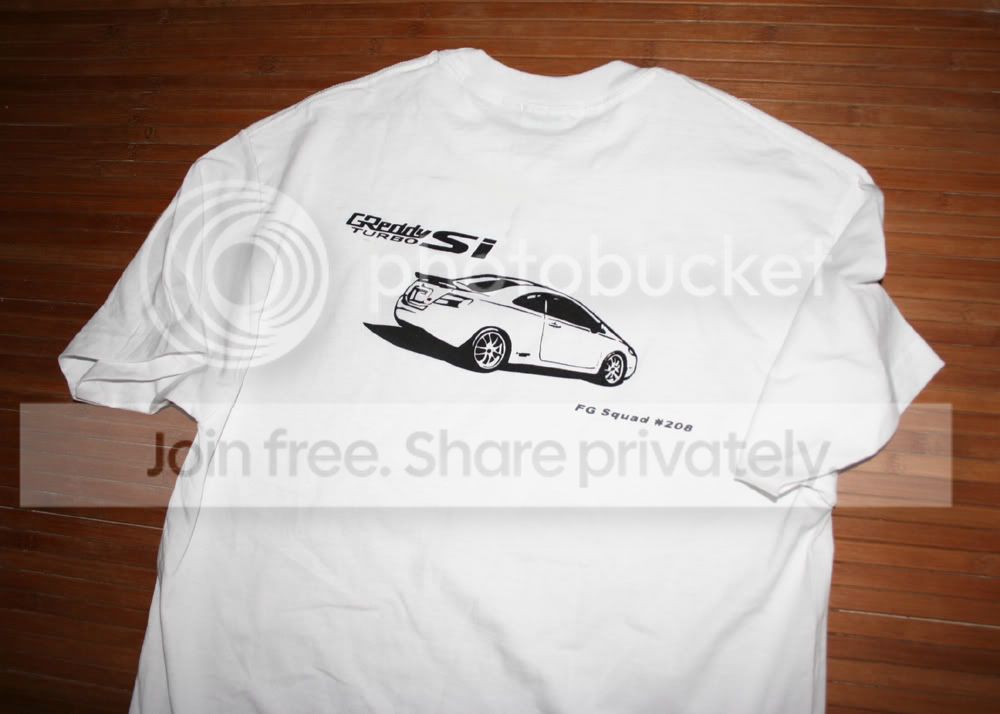
Did a search on youtube for t shirt stenciling and made my own!
1. Take pic of vehicle to be used on t shirt.
2. Use photoshop and change image into grayscale.
3. Change contrast and set to high.
4. Use "stamp" function to change into basic outline of the image used.
5. print.
6. Use an exacto blade and cut out the design on mylar sheets.
7. Use spray adhesive onto the backside of mylar sheet.
8. Use airbrush paint and airbrush or use paint brush dab the paint over the stencil.
10. Let dry.
11. Iron to set the design into the shirt.
Modified by 24boosted at 9:45 PM 4/28/2008

Honda-Tech Member
Joined: Oct 2006
Posts: 150
Likes: 0
From: Kirkland, WA, USA
Re: Repn my FG2 proudly! (Kidnkorner)
that looks sick! I'm impressed you took the time to make that. 
Car looks clean, and the rims fit the car perfectly. Gotta admit, if I had the $$$ to do it right, i'd probably end up with something similar to what you've got. Nice taste!
Car looks clean, and the rims fit the car perfectly. Gotta admit, if I had the $$$ to do it right, i'd probably end up with something similar to what you've got. Nice taste!
Thread Starter
Honda-Tech Member
iTrader: (1)
Joined: Dec 2006
Posts: 1,049
Likes: 0
From: OC, CA, US
Re: Repn my FG2 proudly! (Kidnkorner)
What would we do here w/o Kidnkorner? Moderating as a non mod. Ever get your mag TEs?
Editted....
<TABLE WIDTH="90%" CELLSPACING=0 CELLPADDING=0 ALIGN=CENTER><TR><TD>Quote, originally posted by 24boosted »</TD></TR><TR><TD CLASS="quote">1. Take pic of vehicle to be used on t shirt.
2. Use photoshop and change image into grayscale.
3. Change contrast and set to high.
4. Use "stamp" function to change into basic outline of the image used.
5. print.
6. Use an exacto blade and cut out the design on mylar sheets.
7. Use spray adhesive onto the backside of mylar sheet.
8. Use airbrush paint and airbrush or use paint brush dab the paint over the stencil.
10. Let dry.
11. Iron to set the design into the shirt. </TD></TR></TABLE>
Editted....
<TABLE WIDTH="90%" CELLSPACING=0 CELLPADDING=0 ALIGN=CENTER><TR><TD>Quote, originally posted by 24boosted »</TD></TR><TR><TD CLASS="quote">1. Take pic of vehicle to be used on t shirt.
2. Use photoshop and change image into grayscale.
3. Change contrast and set to high.
4. Use "stamp" function to change into basic outline of the image used.
5. print.
6. Use an exacto blade and cut out the design on mylar sheets.
7. Use spray adhesive onto the backside of mylar sheet.
8. Use airbrush paint and airbrush or use paint brush dab the paint over the stencil.
10. Let dry.
11. Iron to set the design into the shirt. </TD></TR></TABLE>

NO MERCY!
Joined: Dec 2006
Posts: 4,914
Likes: 1
From: San Antonio, TX, U.S.
Re: Repn my FG2 proudly! (Kidnkorner)
<TABLE WIDTH="90%" CELLSPACING=0 CELLPADDING=0 ALIGN=CENTER><TR><TD>Quote, originally posted by Kidnkorner »</TD></TR><TR><TD CLASS="quote">Great, but you posted in the wrong forum. Techless pic threads like this go in the appearance and cosmetic forum.</TD></TR></TABLE>
I think this is a bit of an exception. Some people might actually want to do something like this. It may not be technical.....but it bears a striking resemblance to blue rocket creating a thread about the squad stickers for our cars.
Except 24boosted actually created a DIY for doing something like this. Very thoughtful.
I think this is a bit of an exception. Some people might actually want to do something like this. It may not be technical.....but it bears a striking resemblance to blue rocket creating a thread about the squad stickers for our cars.
Except 24boosted actually created a DIY for doing something like this. Very thoughtful.

Honda-Tech Member
Joined: Nov 2002
Posts: 2,659
Likes: 0
From: Maricopa County
Re: Repn my FG2 proudly! (24boosted)
<TABLE WIDTH="90%" CELLSPACING=0 CELLPADDING=0 ALIGN=CENTER><TR><TD>Quote, originally posted by 24boosted »</TD></TR><TR><TD CLASS="quote">Ever get your mag TEs?
</TD></TR></TABLE>
They have been discontinued, and the units that were in production had RWD offset.
</TD></TR></TABLE>
They have been discontinued, and the units that were in production had RWD offset.

Trending Topics
Thread Starter
Honda-Tech Member
iTrader: (1)
Joined: Dec 2006
Posts: 1,049
Likes: 0
From: OC, CA, US
Re: Repn my FG2 proudly! (elohel)
http://www.youtube.com/watch?v=nDH-0BFozpA
Here is a very informational video on how to do this.
THAT IS NOT ME! I FOUND THIS VIDEO and learned how.
<TABLE WIDTH="90%" CELLSPACING=0 CELLPADDING=0 ALIGN=CENTER><TR><TD>Quote, originally posted by RICO_ »</TD></TR><TR><TD CLASS="quote">
I think this is a bit of an exception. Some people might actually want to do something like this. It may not be technical.....but it bears a striking resemblance to blue rocket creating a thread about the squad stickers for our cars.
Except 24boosted actually created a DIY for doing something like this. Very thoughtful.
</TD></TR></TABLE>
Thanks Rico but where's my cookie?!
Here is a very informational video on how to do this.
THAT IS NOT ME! I FOUND THIS VIDEO and learned how.
<TABLE WIDTH="90%" CELLSPACING=0 CELLPADDING=0 ALIGN=CENTER><TR><TD>Quote, originally posted by RICO_ »</TD></TR><TR><TD CLASS="quote">
I think this is a bit of an exception. Some people might actually want to do something like this. It may not be technical.....but it bears a striking resemblance to blue rocket creating a thread about the squad stickers for our cars.
Except 24boosted actually created a DIY for doing something like this. Very thoughtful.
</TD></TR></TABLE>
Thanks Rico but where's my cookie?!

NO MERCY!
Joined: Dec 2006
Posts: 4,914
Likes: 1
From: San Antonio, TX, U.S.
Re: Repn my FG2 proudly! (24boosted)
<TABLE WIDTH="90%" CELLSPACING=0 CELLPADDING=0 ALIGN=CENTER><TR><TD>Quote, originally posted by 24boosted »</TD></TR><TR><TD CLASS="quote">
Thanks Rico but where's my cookie?! </TD></TR></TABLE>
You've had too many cookies. First the turbo kit....then the custom painted badass wheels.....now this.
Time to go on a diet. 
Thanks Rico but where's my cookie?!
</TD></TR></TABLE>You've had too many cookies. First the turbo kit....then the custom painted badass wheels.....now this.
Time to go on a diet.

Thread
Thread Starter
Forum
Replies
Last Post
JapJunkie
Honda Civic / Del Sol (1992 - 2000)
2
Apr 25, 2004 07:31 AM
