


Radiator Fan Problem


Thread Starter
Honda-Tech Member
Joined: Apr 2006
Posts: 1,683
Likes: 2
From: Columbus, OH
 Radiator Fan Problem
here's the deal:
I took a D15B2 and put it into a 1990 Civic SI. Everything is fine, the engine runs juust fine.
But the Cooling Fan wont come on.
-I replaced the thermostat - no luck.
-Tested the fan, it's good
Im thinking its the:
-Relay
-No power to fan
-Thermosensor
Is there something Im overlooking possibly? Just double checking, I want to be good to go with all possible solutions tommorow when I get to work.
I took a D15B2 and put it into a 1990 Civic SI. Everything is fine, the engine runs juust fine.
But the Cooling Fan wont come on.
-I replaced the thermostat - no luck.
-Tested the fan, it's good
Im thinking its the:
-Relay
-No power to fan
-Thermosensor
Is there something Im overlooking possibly? Just double checking, I want to be good to go with all possible solutions tommorow when I get to work.

Honda-Tech Member

Joined: Sep 2002
Posts: 5,647
Likes: 29
From: colorado springs, co, usa
Re: Radiator Fan Problem (G0crxG0)
unplug the connector for the cooling fan switch - it is on the back of the block next to the oil filter - has 2-wire connector with big round black rubber boot - turn ignition on and touch the 2 wires together - the fan should come on - if it does, the switch in the block is bad - if it doesn't, check the cooling fan relay which is on the passenger side inner fender panel just behind the headlight
Thread Starter
Honda-Tech Member
Joined: Apr 2006
Posts: 1,683
Likes: 2
From: Columbus, OH
Ok I'll check that
After goin out there and checkin a few things, I decided to start it up and let it get a lil hot, then I turned the fan on (by hooking it up to power directly) to see if it cooled off.
It just got hotter.
Could this be a blown head gasket? It idles and drives just fine, and doesnt leak anywhere at all. I pulled the dip stick but couldnt tell if there was coolant in the oil.
If the head gasket was blown would there be rad fluid in the oil and vice versa?
After goin out there and checkin a few things, I decided to start it up and let it get a lil hot, then I turned the fan on (by hooking it up to power directly) to see if it cooled off.
It just got hotter.
Could this be a blown head gasket? It idles and drives just fine, and doesnt leak anywhere at all. I pulled the dip stick but couldnt tell if there was coolant in the oil.
If the head gasket was blown would there be rad fluid in the oil and vice versa?


Honda-Tech Member
Joined: Jan 2007
Posts: 1,748
Likes: 1
From: Humboldt, ca, usa
Re: Radiator Fan Problem (G0crxG0)
if you want to check for a blown headgasket, and you cant tell by the oil or coolant take it to a smog shop and have them "sniff" (for emissions) the radiator. this will tell you for sure.

Honda-Tech Member
Joined: Aug 2007
Posts: 21
Likes: 0
From: Leavenworth, WA, USA
Re: (CRX Toad)
"After goin out there and checkin a few things, I decided to start it up and let it get a lil hot, then I turned the fan on (by hooking it up to power directly) to see if it cooled off.
It just got hotter."
I would worry about: 1)the radiator being plugged up with gunk, or 2) the water pump not working adequately. How could it not be one of these two things ? You've already replaced your thermostat, so that shouldn't be the problem.
It just got hotter."
I would worry about: 1)the radiator being plugged up with gunk, or 2) the water pump not working adequately. How could it not be one of these two things ? You've already replaced your thermostat, so that shouldn't be the problem.
Trending Topics

Honda-Tech Member
Joined: Nov 2006
Posts: 919
Likes: 0
From: College Park, MD
Re: Radiator Fan Problem (G0crxG0)
you could make your on on/off switch to keep it on all the time, then when you turn your car off, turn the switch to the off position.
I'm not sure about your other problem though.
I'm not sure about your other problem though.
Thread Starter
Honda-Tech Member
Joined: Apr 2006
Posts: 1,683
Likes: 2
From: Columbus, OH
haha whats up Toad, hows it goin? you likin those Buckeyes this year I bet!
Yea, Im thinkin the fan isnt coming on cause the ECU isnt sending the signal too for whatever reason.
I dont think the radiator is bad, it doesnt leak so I dont think its cracked, and the fluid that was in it prior to replacing the engine was clean as can be.
and to whoever said it: your retarded, replace the engine? if I replaced the engine everytime it overheated... nevermind
Yea, Im thinkin the fan isnt coming on cause the ECU isnt sending the signal too for whatever reason.
I dont think the radiator is bad, it doesnt leak so I dont think its cracked, and the fluid that was in it prior to replacing the engine was clean as can be.
and to whoever said it: your retarded, replace the engine? if I replaced the engine everytime it overheated... nevermind

Junior Member
Joined: Oct 2007
Posts: 136
Likes: 0
From: compton, ca, usa
Re: (G0crxG0)
just take the negative wire and ground it to the frame somewhere near where it hangs. this way itll just come on when u turn the key to the on postition. i beleive there is a black and green wire. the black one should b the negative. just strip off some wire cover and screw it to the frame. the fan could burn out but mine has been running for a good eight months now. phew long post
Thread Starter
Honda-Tech Member
Joined: Apr 2006
Posts: 1,683
Likes: 2
From: Columbus, OH
information I've left out
- it has a new timing belt and water pump
- has no TPS sensor and is throwing code 7 (TPS Sensor)
I dont know if that info is relevant but thought Id include it. Time to go mess with this thing....
- it has a new timing belt and water pump
- has no TPS sensor and is throwing code 7 (TPS Sensor)
I dont know if that info is relevant but thought Id include it. Time to go mess with this thing....
Honda-Tech Member
Joined: Jan 2007
Posts: 1,748
Likes: 1
From: Humboldt, ca, usa
Re: (G0crxG0)
I dont know that a TPS sensor, or lack of it would cause this, but you will need one sooner or later. maybe that will change things for you.
my thought is, that if anything is out of the ordinary, than ist suspect and should be eliminated as a possible problem
my thought is, that if anything is out of the ordinary, than ist suspect and should be eliminated as a possible problem
Thread Starter
Honda-Tech Member
Joined: Apr 2006
Posts: 1,683
Likes: 2
From: Columbus, OH
my thinking exactly, but I cant buy just the TPS sensor, its in the throttle body, and I cant buy a TB at the store.
So today I go out and start it up, and immediately plug the fan to the battery so it can cool from the start.
Yesterday it overheated just idling in the drive way, but after 5min of it idling and the heat gauge still below half (barely) I took it for a drive.
After about 20 min of city driving (10 mi or so) and a few miles on the free way at 65mph, this is how hot it got:
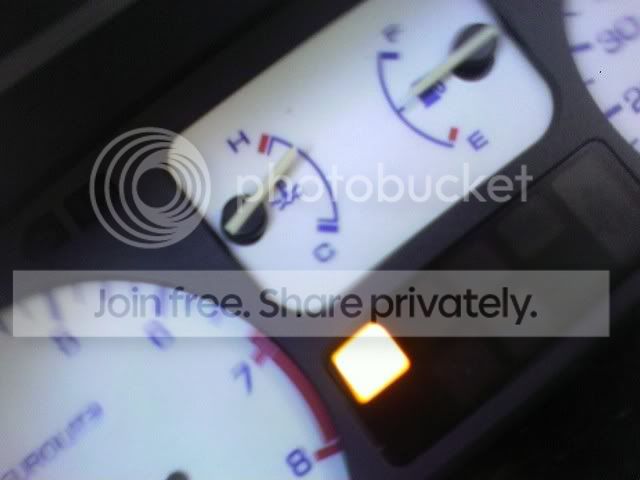
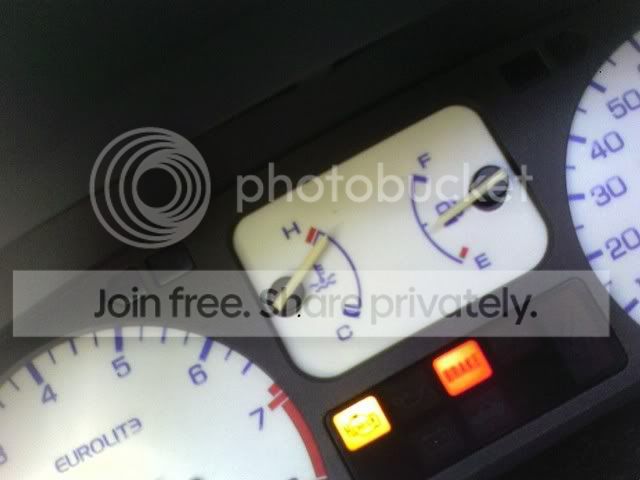
After I got off the freeway, I stopped at the store between my house and the freeway exit. I turned it off, got out realized I had no money, got back in, and it had gotten hotter. I drove it home and it got a tiny bit hotter as I drove it home. This is as hot as it got:
So im confused as hell now.
-Does a new water pump take a little breaking in to fully function?
-Could the radiator just be backed up, or bad?
So today I go out and start it up, and immediately plug the fan to the battery so it can cool from the start.
Yesterday it overheated just idling in the drive way, but after 5min of it idling and the heat gauge still below half (barely) I took it for a drive.
After about 20 min of city driving (10 mi or so) and a few miles on the free way at 65mph, this is how hot it got:
After I got off the freeway, I stopped at the store between my house and the freeway exit. I turned it off, got out realized I had no money, got back in, and it had gotten hotter. I drove it home and it got a tiny bit hotter as I drove it home. This is as hot as it got:
So im confused as hell now.
-Does a new water pump take a little breaking in to fully function?
-Could the radiator just be backed up, or bad?
Honda-Tech Member
Joined: Jan 2007
Posts: 1,748
Likes: 1
From: Humboldt, ca, usa
Re: (G0crxG0)
wow thats HOT, so is your head gasket still ok? have you you used a "sniffer" to check for exhaust/emissions in the radiator?
did you use a Honda thremostat or a cheapo one?
btw is the CEL coming on #6 coolant temp (ect,cts) or something else.
and for the TPS sensor, check out www.kingmotorsports.com for a tps, alone without throttle body, omnipower makes this.
did you use a Honda thremostat or a cheapo one?
btw is the CEL coming on #6 coolant temp (ect,cts) or something else.
and for the TPS sensor, check out www.kingmotorsports.com for a tps, alone without throttle body, omnipower makes this.
Thread Starter
Honda-Tech Member
Joined: Apr 2006
Posts: 1,683
Likes: 2
From: Columbus, OH
I dont know how to check the head gasket. but its not leaking to my knowledge....
Im changing out the Coolant Temp Sensor right now. Gonna do that and check out the thermosensor aswell
Im changing out the Coolant Temp Sensor right now. Gonna do that and check out the thermosensor aswell
Honda-Tech Member
Joined: Jan 2007
Posts: 1,748
Likes: 1
From: Humboldt, ca, usa
Re: (G0crxG0)
<TABLE WIDTH="90%" CELLSPACING=0 CELLPADDING=0 ALIGN=CENTER><TR><TD>Quote, originally posted by grog »</TD></TR><TR><TD CLASS="quote"> have you you used a "sniffer" to check for exhaust/emissions in the radiator</TD></TR></TABLE>
some headgasket leaks are very slow, and sometimes the oil and coolant dont mix, but exhaust gasses escape the cylinder and get forced into the cooling system heating it up.
to check for this kind of leak you can take it to a smog shop and have them "sniff" your radiator for emissions.
another thing to check is, when everything is warmed up feel around with your hand on the radiator to feel the temp. a clogged radiator will have cold spots where the obstuction is. a good radiator will be the roughly the same temp all over.
also when its hot have you felt the lower rad hose? this will tell you if the thermostat is opening or not.
some headgasket leaks are very slow, and sometimes the oil and coolant dont mix, but exhaust gasses escape the cylinder and get forced into the cooling system heating it up.
to check for this kind of leak you can take it to a smog shop and have them "sniff" your radiator for emissions.
another thing to check is, when everything is warmed up feel around with your hand on the radiator to feel the temp. a clogged radiator will have cold spots where the obstuction is. a good radiator will be the roughly the same temp all over.
also when its hot have you felt the lower rad hose? this will tell you if the thermostat is opening or not.

Junior Member
Joined: Oct 2007
Posts: 136
Likes: 0
From: compton, ca, usa
Re: (Crx Jimmy)
seriously. my car did that and didnt show sighns of leaking or anything till it blew. i suggest u take it to a professional if u dont know. my civic didnt show any sighns of anything. then the last day it had coolant in the oil and smoked like crazy. just spend some money on a motor and swap it.
Honda-Tech Member
Joined: Jan 2007
Posts: 1,748
Likes: 1
From: Humboldt, ca, usa
Re: (xxxbigspoonxxx)
<TABLE WIDTH="90%" CELLSPACING=0 CELLPADDING=0 ALIGN=CENTER><TR><TD>Quote, originally posted by xxxbigspoonxxx »</TD></TR><TR><TD CLASS="quote">seriously. my car did that and didnt show sighns of leaking or anything till it blew. i suggest u take it to a professional if u dont know. my civic didnt show any sighns of anything. then the last day it had coolant in the oil and smoked like crazy. just spend some money on a motor and swap it.</TD></TR></TABLE>
dont swap anything! I think what he should of said is spend some money and take it to a pro, or like the smog shop to test the radiator, before you go too far.
dont swap anything! I think what he should of said is spend some money and take it to a pro, or like the smog shop to test the radiator, before you go too far.
Thread Starter
Honda-Tech Member
Joined: Apr 2006
Posts: 1,683
Likes: 2
From: Columbus, OH
Re: (grog)
<TABLE WIDTH="90%" CELLSPACING=0 CELLPADDING=0 ALIGN=CENTER><TR><TD>Quote, originally posted by grog »</TD></TR><TR><TD CLASS="quote">
dont swap anything! I think what he should of said is spend some money and take it to a pro, or like the smog shop to test the radiator, before you go too far.</TD></TR></TABLE>
WTF is with people telling me to swap my engine over a cooling problem?
I mean, there are SLIGHT signs of the head gasket being problematic, but you NEVER do something as extreme as replacing your engine without FULLY trouble shooting the situation
So I fixed the problem, it was the Coolant Temperature Sensor.
I checked the wiring to make sure it was receiving/sending signal (by grounding the wire and turning the ignition, for those who dont know) and it worked fine. So I pulled the old one out, my buddy snapped the new one of in the engine, we got it out, put in a new one from one of my other engines, and voila, no overheating, no fan problem.
All is good in my world of Hondas.
Thanks alot for your constant input Grog, its not often people see problems through to the end on this site.
dont swap anything! I think what he should of said is spend some money and take it to a pro, or like the smog shop to test the radiator, before you go too far.</TD></TR></TABLE>
WTF is with people telling me to swap my engine over a cooling problem?
I mean, there are SLIGHT signs of the head gasket being problematic, but you NEVER do something as extreme as replacing your engine without FULLY trouble shooting the situation
So I fixed the problem, it was the Coolant Temperature Sensor.
I checked the wiring to make sure it was receiving/sending signal (by grounding the wire and turning the ignition, for those who dont know) and it worked fine. So I pulled the old one out, my buddy snapped the new one of in the engine, we got it out, put in a new one from one of my other engines, and voila, no overheating, no fan problem.
All is good in my world of Hondas.
Thanks alot for your constant input Grog, its not often people see problems through to the end on this site.
 Re: (G0crxG0)
I am having random overheating problems too. I wanted to know if it may be the coolant temp sensor.
But my situation started with my radiator having a leak and air in the system and it overheated.
I changed the radiator to a full length aluminum koyo, samco hoses, brand new oem termostat, and a 12 inch slim fan which is always on. I used Honda coolant which is premixed 50/50 and bled the system mulitple times though the termostat, and leaving the cap off to relieve air for a hour.
Now as i drive my car it will stay at perfect temp for half an hour or so but as soon as i get to a dead stop such as a read my temp starts to creep up??? And the fan is on btw
headgasket possibly?
But my situation started with my radiator having a leak and air in the system and it overheated.
I changed the radiator to a full length aluminum koyo, samco hoses, brand new oem termostat, and a 12 inch slim fan which is always on. I used Honda coolant which is premixed 50/50 and bled the system mulitple times though the termostat, and leaving the cap off to relieve air for a hour.
Now as i drive my car it will stay at perfect temp for half an hour or so but as soon as i get to a dead stop such as a read my temp starts to creep up??? And the fan is on btw
headgasket possibly?
Thread Starter
Honda-Tech Member
Joined: Apr 2006
Posts: 1,683
Likes: 2
From: Columbus, OH
couldnt tell ya
but go check you coolant temp sensor wire to make sure its sending signal, and check your thermo sensor like dude said earlier in the thread. that covers most everything in the cooling process thats problematic
but go check you coolant temp sensor wire to make sure its sending signal, and check your thermo sensor like dude said earlier in the thread. that covers most everything in the cooling process thats problematic

Honda-Tech Member
Joined: Aug 2004
Posts: 1,657
Likes: 1
From: Socal, USA
Re: (G0crxG0)
Yeah I am having some what of the same problem. My fan doesn't kick on. The fan works, I changed the thermostat. I connected the 2 wires that goto the switch and the fan turned on. The relay is working, I changed the switch in the back of the block for a new one. My car doesn't over heat it stays a little under halfway. The only thing I haven't changed is the Coolant Temperature Sensor but it seems like it works because I get a correct reading from it. I'll change it and see what happens
Honda-Tech Member
Joined: Jan 2007
Posts: 1,748
Likes: 1
From: Humboldt, ca, usa
Re: (Zaakro)
<TABLE WIDTH="90%" CELLSPACING=0 CELLPADDING=0 ALIGN=CENTER><TR><TD>Quote, originally posted by Zaakro »</TD></TR><TR><TD CLASS="quote"> My car doesn't over heat it stays a little under halfway. </TD></TR></TABLE>
Hey Zaakro, i had the same issue with my car, but i finaly found out it wasnt an issue at all. i replaced all those sensors and the relay too, and they didn't "make my fan turn on". I finaly found out it takes about 35-40 at idle for my motor to get hot enough to turn the fan on, . and in the past i never had let it idle that long. I was so f&%%ing amazed that the fan Had ACTUALY CAME ON! I had known everything was working, but I had never actualy heard the fan kick on.
so give it 45 minutes or so (if it does'nt actualy overheat) before replacing anything.
Hey Zaakro, i had the same issue with my car, but i finaly found out it wasnt an issue at all. i replaced all those sensors and the relay too, and they didn't "make my fan turn on". I finaly found out it takes about 35-40 at idle for my motor to get hot enough to turn the fan on,
. and in the past i never had let it idle that long. I was so f&%%ing amazed that the fan Had ACTUALY CAME ON! I had known everything was working, but I had never actualy heard the fan kick on.so give it 45 minutes or so (if it does'nt actualy overheat) before replacing anything.