


photoshop




Honda-Tech Member
Joined: Jun 2005
Posts: 1,214
Likes: 0
From: north pole
 Re: photoshop (life sux die)
<TABLE WIDTH="90%" CELLSPACING=0 CELLPADDING=0 ALIGN=CENTER><TR><TD>Quote, originally posted by life sux die »</TD></TR><TR><TD CLASS="quote">1. take picutre with hood up.
2. take picture with hood down.
3. merge photos in photoshop.
</TD></TR></TABLE>
you will be needing a tripod
2. take picture with hood down.
3. merge photos in photoshop.
</TD></TR></TABLE>
you will be needing a tripod

Joined: Feb 2005
Posts: 1,037
Likes: 0
From: Im baked most of the time., CA, USA
Re: photoshop (spoon_meeH)
<TABLE WIDTH="90%" CELLSPACING=0 CELLPADDING=0 ALIGN=CENTER><TR><TD>Quote, originally posted by spoon_meeH »</TD></TR><TR><TD CLASS="quote">you will be needing a tripod</TD></TR></TABLE>
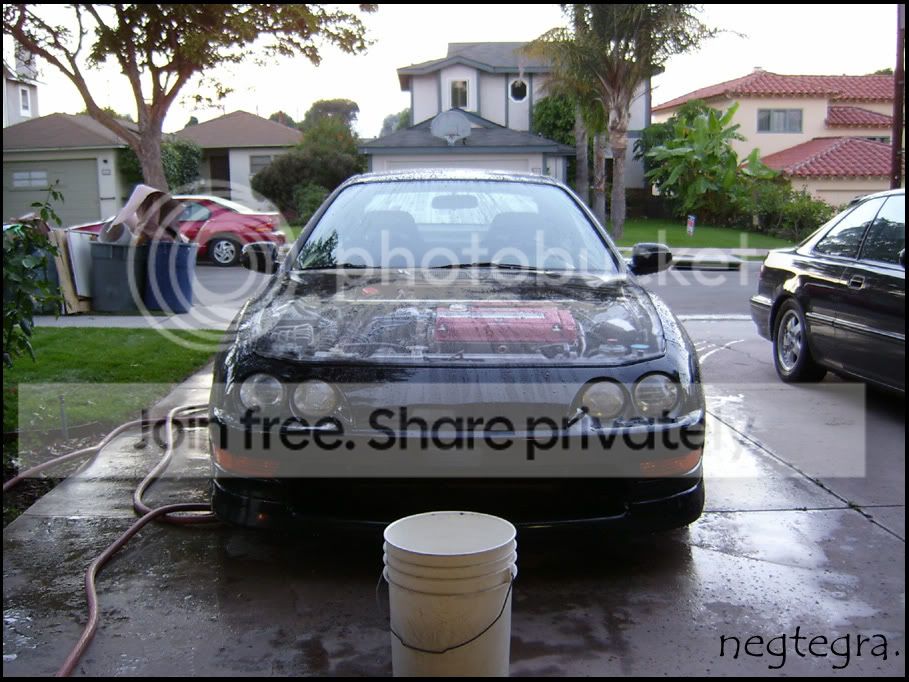
'Tis true you do need a tripod. In photoshop use the "lasso" tool to select the part you want, whether you take the engine and put it on the closed hood or the hood over the engine, then change the transparancy of it and clean the details and it should look like this...

'Tis true you do need a tripod. In photoshop use the "lasso" tool to select the part you want, whether you take the engine and put it on the closed hood or the hood over the engine, then change the transparancy of it and clean the details and it should look like this...

Joined: Feb 2005
Posts: 1,037
Likes: 0
From: Im baked most of the time., CA, USA
Re: (zanthrax)
You'll need to have two copies of the picture you want to do it to, it just makes things easier.
Then use the "Lasso" tool and select the portion you want to be transparant on pic 'A'. Once selected go to "Layer/New/Layer via Copy," you'll see over in the right tool bar that a new layer "Layer 1" appeared. Click and hold on "Layer 1" and drag to pic 'B,' what you had selected before will now be on the other pic. Make sure you have the portion selected (Layer 1) on pic 'B' and look at the top bar, you should see "Opacity" change that to a lower percentage and then fix the edges with the blur tool or whatever you want.

Then use the "Lasso" tool and select the portion you want to be transparant on pic 'A'. Once selected go to "Layer/New/Layer via Copy," you'll see over in the right tool bar that a new layer "Layer 1" appeared. Click and hold on "Layer 1" and drag to pic 'B,' what you had selected before will now be on the other pic. Make sure you have the portion selected (Layer 1) on pic 'B' and look at the top bar, you should see "Opacity" change that to a lower percentage and then fix the edges with the blur tool or whatever you want.

Thread
Thread Starter
Forum
Replies
Last Post