


[FAQ] How To Rewire Seatbelt And Trunk Lights On Civic SiR EG6 Cluster With TCS


Thread Starter
Honda-Tech Member
iTrader: (5)
Joined: Apr 2003
Posts: 23,967
Likes: 9
From: Las Vegas
 [FAQ] How To Rewire Seatbelt And Trunk Lights On Civic SiR EG6 Cluster With TCS
I sure hope most people know that there are two types of Civic SiR2 (EG6) clusters. There are the ones without the door indicators with TCS, the most common ones; and there are the ones with the above options. The problem between the USDM clusters & the 'common' SiR cluster and the TCS SiR cluster is that the seatbelt light and trunk light are on the fuel/temp gauge as opposed to just having the seatbelt light on the fuel/temp gauge. With the trunk opened, the seatbelt light would turn on on the TCS cluster because the seatbelt light is where the trunk light would be. The trunk light is on the tachometer.
Without door indicators and TCS:
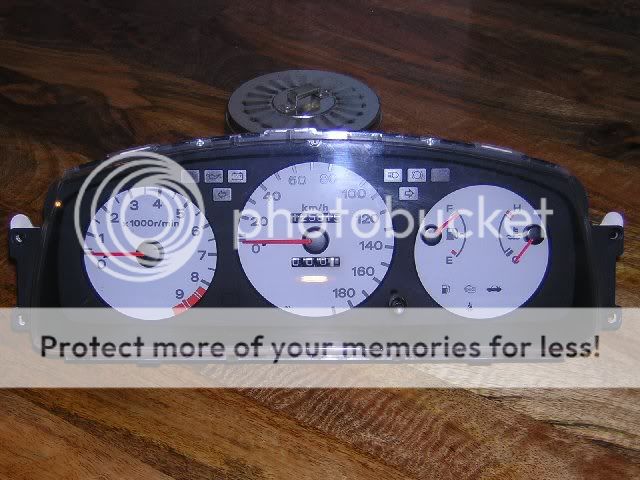
With door indicators and TCS:

1. Remove the dash bezel by removing the two screws above the cluster and the one behind the hazard button. Use a thin flathead screwdriver to pry the button and to pry the dash bezel from the driver side vent. Unplug the clock, if applicable.
2. Remove the four screws holding in the gauge cluster, two on each side. Next, unplug the plugs from the rear of the cluster.
3. You will be working on the 10-pin plug. As you can see the last two wires on the bottom are green and blue/white, respectively. The blue/white wire is your seatbelt light and the green wire is your trunk light.
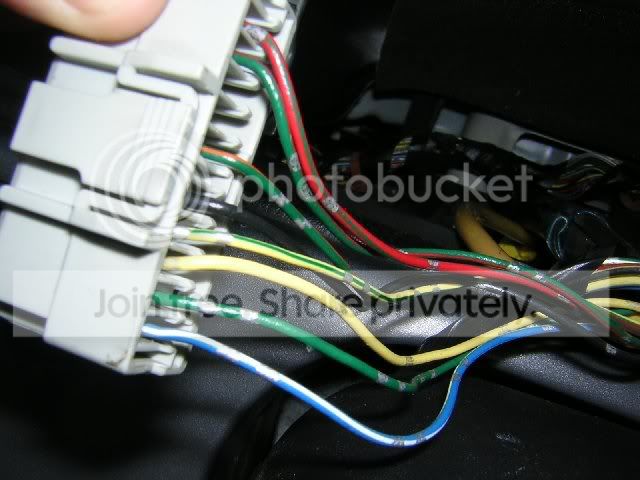
4. On the plug, you will see a white piece of plastic. You will need to remove this piece by sliding it under the plug toward the wires. You will know what I am talking about when you look at it. Next, if you look inside the pinhole, you will see plastic hooks. These hooks hold the wire inside the plug.
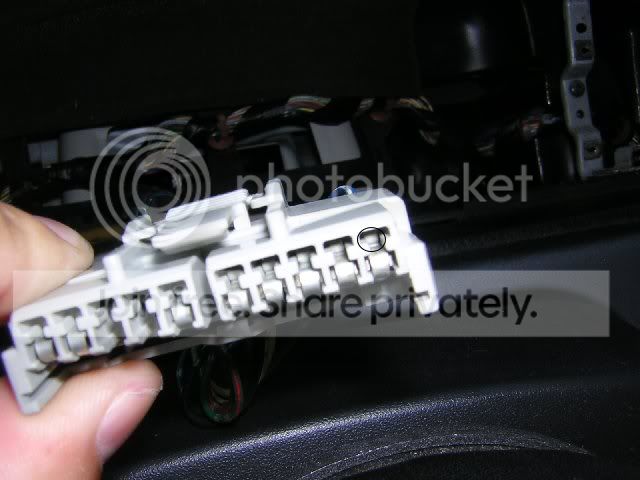
5. Taking a medium sized safety pin, you will push down on that plastic hook while gently tugging the green and blue/white wires from the back to remove the wires.
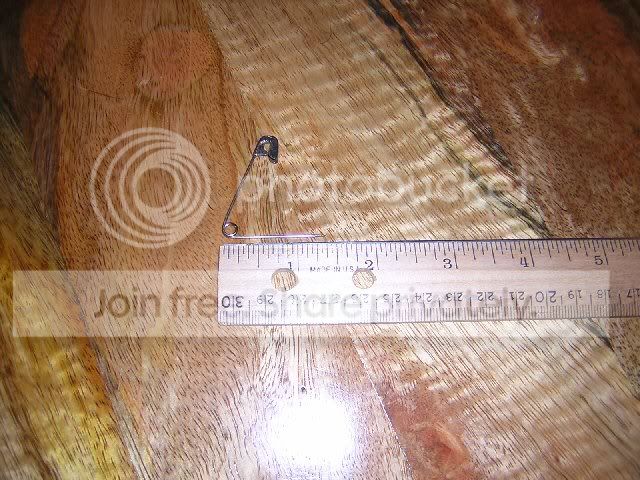
6. Take the blue/white wire and move it into pinhole where the green wire came out off. Leave the green wire out of the plug. Reinstall the white plastic piece.
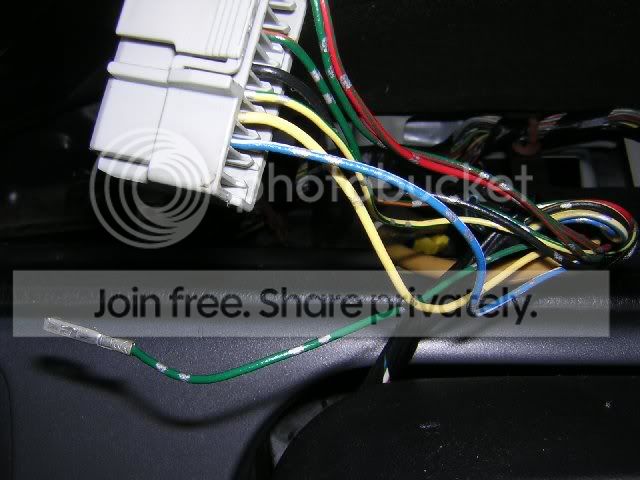
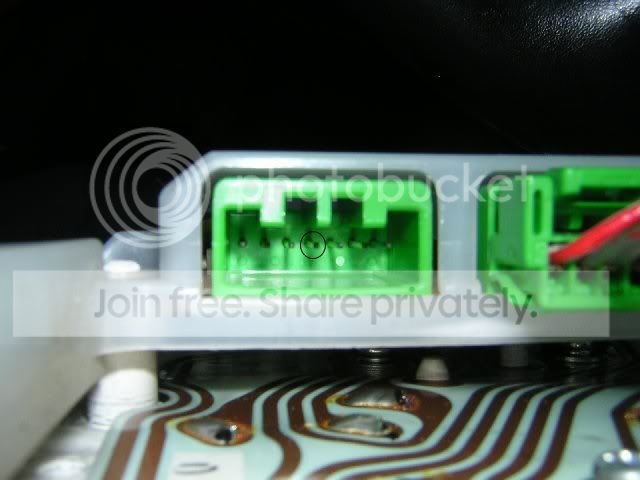
7a. To those with the two green plugs behind the tachometer, this next step will be easy. On the bottom green plug, you will see a green wire right in the middle of the plug. Hmm, green wire there and green wire that you just removed? Yup, they match. You will strip the insulator off the green wire coming off green plug. You will wrap this end around the metal pin on the green wire from that grey plug that you removed. Tape it up with black electrical tape. I do not suggest you solder it on to the pin incase you have to wire your harness back to a USDM cluster.

7b. To those unlucky not to receive the green plugs behind the tachometer, this next step will take a little more work. You will need to cut off the pin off the green wire that you remove from the grey plug. Then cut some off insulator off and solder that wire to middle prong. The downside is that if you have to remove the cluster for any reason, you will have to cut the wire. Another downside is if you have to rewire the harness again to accept a USDM cluster.
8. Reinstall everything

On another note: Those wanting to wire up the door indicators, I have not had time to play around with that since I just got this cluster a couple of days ago. Most likely you will have to tap off of the door sensor for the dome light and connect them to the two wires on the same green plug (off to the right in the above picture) as the trunk light.
Without door indicators and TCS:
With door indicators and TCS:
1. Remove the dash bezel by removing the two screws above the cluster and the one behind the hazard button. Use a thin flathead screwdriver to pry the button and to pry the dash bezel from the driver side vent. Unplug the clock, if applicable.
2. Remove the four screws holding in the gauge cluster, two on each side. Next, unplug the plugs from the rear of the cluster.
3. You will be working on the 10-pin plug. As you can see the last two wires on the bottom are green and blue/white, respectively. The blue/white wire is your seatbelt light and the green wire is your trunk light.
4. On the plug, you will see a white piece of plastic. You will need to remove this piece by sliding it under the plug toward the wires. You will know what I am talking about when you look at it. Next, if you look inside the pinhole, you will see plastic hooks. These hooks hold the wire inside the plug.
5. Taking a medium sized safety pin, you will push down on that plastic hook while gently tugging the green and blue/white wires from the back to remove the wires.
6. Take the blue/white wire and move it into pinhole where the green wire came out off. Leave the green wire out of the plug. Reinstall the white plastic piece.
7a. To those with the two green plugs behind the tachometer, this next step will be easy. On the bottom green plug, you will see a green wire right in the middle of the plug. Hmm, green wire there and green wire that you just removed? Yup, they match. You will strip the insulator off the green wire coming off green plug. You will wrap this end around the metal pin on the green wire from that grey plug that you removed. Tape it up with black electrical tape. I do not suggest you solder it on to the pin incase you have to wire your harness back to a USDM cluster.
7b. To those unlucky not to receive the green plugs behind the tachometer, this next step will take a little more work. You will need to cut off the pin off the green wire that you remove from the grey plug. Then cut some off insulator off and solder that wire to middle prong. The downside is that if you have to remove the cluster for any reason, you will have to cut the wire. Another downside is if you have to rewire the harness again to accept a USDM cluster.
8. Reinstall everything
On another note: Those wanting to wire up the door indicators, I have not had time to play around with that since I just got this cluster a couple of days ago. Most likely you will have to tap off of the door sensor for the dome light and connect them to the two wires on the same green plug (off to the right in the above picture) as the trunk light.


HT Order of Merit


Joined: Aug 2004
Posts: 7,199
Likes: 3
From: Connecticut
Re: [FAQ] How To Rewire Seatbelt And Trunk Lights On Civic SiR EG6 Cluster With TCS (nocturnaldragon
Dude, where did you pick up that cluster that goes to 240km? I've been looking for that forever.
Wanna sell it?

Wanna sell it?
Thread Starter
Honda-Tech Member
iTrader: (5)
Joined: Apr 2003
Posts: 23,967
Likes: 9
From: Las Vegas
Re: [FAQ] How To Rewire Seatbelt And Trunk Lights On Civic SiR EG6 Cluster With TCS (nocturnaldragon
<TABLE WIDTH="90%" CELLSPACING=0 CELLPADDING=0 ALIGN=CENTER><TR><TD>Quote, originally posted by JDM_Ej »</TD></TR><TR><TD CLASS="quote">Dude, where did you pick up that cluster that goes to 240km? I've been looking for that forever.
Wanna sell it?
</TD></TR></TABLE>
I just got it 2 days ago. I bought it off eBay. I've seen one about 4 months ago and lost my bid. I saw this and had to have it. It's a K's Meter Works speedometer. The only bad thing about it is when it lights up, the lighting is slightly more orange than the rest and the light dispersal is poor.
Wanna sell it?
</TD></TR></TABLE>I just got it 2 days ago. I bought it off eBay. I've seen one about 4 months ago and lost my bid. I saw this and had to have it. It's a K's Meter Works speedometer. The only bad thing about it is when it lights up, the lighting is slightly more orange than the rest and the light dispersal is poor.
HT Order of Merit
Joined: Aug 2004
Posts: 7,199
Likes: 3
From: Connecticut
Re: [FAQ] How To Rewire Seatbelt And Trunk Lights On Civic SiR EG6 Cluster With TCS (nocturnaldragon
<TABLE WIDTH="90%" CELLSPACING=0 CELLPADDING=0 ALIGN=CENTER><TR><TD>Quote, originally posted by BlueIntegraBoy »</TD></TR><TR><TD CLASS="quote">
I just got it 2 days ago. I bought it off eBay. I've seen one about 4 months ago and lost my bid. I saw this and had to have it. It's a K's Meter Works speedometer. The only bad thing about it is when it lights up, the lighting is slightly more orange than the rest and the light dispersal is poor.</TD></TR></TABLE>
Ah that figures. I know Spoon made a 240km EG speedo, but you can't find that for less than 800$. I'll have to keep an eye out. Thanks!
I just got it 2 days ago. I bought it off eBay. I've seen one about 4 months ago and lost my bid. I saw this and had to have it. It's a K's Meter Works speedometer. The only bad thing about it is when it lights up, the lighting is slightly more orange than the rest and the light dispersal is poor.</TD></TR></TABLE>
Ah that figures. I know Spoon made a 240km EG speedo, but you can't find that for less than 800$. I'll have to keep an eye out. Thanks!
Trending Topics
Thread Starter
Honda-Tech Member
iTrader: (5)
Joined: Apr 2003
Posts: 23,967
Likes: 9
From: Las Vegas
Re: [FAQ] How To Rewire Seatbelt And Trunk Lights On Civic SiR EG6 Cluster With TCS (nocturnaldragon
<TABLE WIDTH="90%" CELLSPACING=0 CELLPADDING=0 ALIGN=CENTER><TR><TD>Quote, originally posted by JDM_Ej »</TD></TR><TR><TD CLASS="quote">
Ah that figures. I know Spoon made a 240km EG speedo, but you can't find that for less than 800$. I'll have to keep an eye out. Thanks!</TD></TR></TABLE>
cxSHOE can get a Spoon speedometer, but he requires a deposit.
Ah that figures. I know Spoon made a 240km EG speedo, but you can't find that for less than 800$. I'll have to keep an eye out. Thanks!</TD></TR></TABLE>
cxSHOE can get a Spoon speedometer, but he requires a deposit.
HT Order of Merit
Joined: Aug 2004
Posts: 7,199
Likes: 3
From: Connecticut
Re: [FAQ] How To Rewire Seatbelt And Trunk Lights On Civic SiR EG6 Cluster With TCS (nocturnaldragon
<TABLE WIDTH="90%" CELLSPACING=0 CELLPADDING=0 ALIGN=CENTER><TR><TD>Quote, originally posted by BlueIntegraBoy »</TD></TR><TR><TD CLASS="quote">
cxSHOE can get a Spoon speedometer, but he requires a deposit.</TD></TR></TABLE>
Yea i talked to him about it. Im not spending 800$ on a damn speedo though.
cxSHOE can get a Spoon speedometer, but he requires a deposit.</TD></TR></TABLE>
Yea i talked to him about it. Im not spending 800$ on a damn speedo though.

Honda-Tech Member
Joined: Jan 2006
Posts: 10,443
Likes: 2
From: Rochester, New York -> Santa Clara, CA
definately nice..
You should find out which year/models use the double greens behind the tach and which yers/models have to cut the prong (which seems like a lot of work)
You should find out which year/models use the double greens behind the tach and which yers/models have to cut the prong (which seems like a lot of work)
Thread Starter
Honda-Tech Member
iTrader: (5)
Joined: Apr 2003
Posts: 23,967
Likes: 9
From: Las Vegas
Re: (Syndacate)
<TABLE WIDTH="90%" CELLSPACING=0 CELLPADDING=0 ALIGN=CENTER><TR><TD>Quote, originally posted by Syndacate »</TD></TR><TR><TD CLASS="quote">definately nice..
You should find out which year/models use the double greens behind the tach and which yers/models have to cut the prong (which seems like a lot of work) </TD></TR></TABLE>
94-95 Civic SiR-S models had the the TCS option and thus the door indicators. Some other JDM models such as the VTi also had the door indicators. You can only get those plugs from that model. I'm not sure if any USDM Honda had those plugs (ie Accord).
You should find out which year/models use the double greens behind the tach and which yers/models have to cut the prong (which seems like a lot of work)
</TD></TR></TABLE>94-95 Civic SiR-S models had the the TCS option and thus the door indicators. Some other JDM models such as the VTi also had the door indicators. You can only get those plugs from that model. I'm not sure if any USDM Honda had those plugs (ie Accord).

Honda-Tech Member
Joined: Oct 2002
Posts: 5,152
Likes: 24
From: chicago burbs, Il, USA
good write up. 
making the door indicators work....
http://www.e-hatch.com/images/moto/doorlight.jpg
driver's door and passengers door are seperate in the car.
tap the wires for the door pins and run them seperately to the apropriate connections on the cluster.
making the door indicators work....
http://www.e-hatch.com/images/moto/doorlight.jpg
driver's door and passengers door are seperate in the car.
tap the wires for the door pins and run them seperately to the apropriate connections on the cluster.
Thread Starter
Honda-Tech Member
iTrader: (5)
Joined: Apr 2003
Posts: 23,967
Likes: 9
From: Las Vegas
Re: (Relic1)
<TABLE WIDTH="90%" CELLSPACING=0 CELLPADDING=0 ALIGN=CENTER><TR><TD>Quote, originally posted by Relic1 »</TD></TR><TR><TD CLASS="quote">good write up.
making the door indicators work....
http://www.e-hatch.com/images/moto/doorlight.jpg
driver's door and passengers door are seperate in the car.
tap the wires for the door pins and run them seperately to the apropriate connections on the cluster.</TD></TR></TABLE>
Awesome, thanks. Now I won't have to guess the wires. I was going to tap off the door sensor.
making the door indicators work....
http://www.e-hatch.com/images/moto/doorlight.jpg
driver's door and passengers door are seperate in the car.
tap the wires for the door pins and run them seperately to the apropriate connections on the cluster.</TD></TR></TABLE>
Awesome, thanks. Now I won't have to guess the wires. I was going to tap off the door sensor.


Joined: Jun 2006
Posts: 16
Likes: 0
From: Schwerin, MV, Germany
Re: (Jdm EJ1 Coupe)
hmm....I'm too stupid to understand that
I have to add an additional wire for both doors to the indicator of the gauge cluster?
I thought that the wire on the left and right door is the same?
Or am I wrong?
and what is this indicator on the SiR gauge cluster standig for:

thanks,
Hannes
I have to add an additional wire for both doors to the indicator of the gauge cluster?
I thought that the wire on the left and right door is the same?
Or am I wrong?
and what is this indicator on the SiR gauge cluster standig for:
thanks,
Hannes
Thread Starter
Honda-Tech Member
iTrader: (5)
Joined: Apr 2003
Posts: 23,967
Likes: 9
From: Las Vegas
Re: (Witwe)
<TABLE WIDTH="90%" CELLSPACING=0 CELLPADDING=0 ALIGN=CENTER><TR><TD>Quote, originally posted by Witwe »</TD></TR><TR><TD CLASS="quote">hmm....I'm too stupid to understand that
I have to add an additional wire for both doors to the indicator of the gauge cluster?
I thought that the wire on the left and right door is the same?
Or am I wrong?
</TD></TR></TABLE>
I wired up my door sensors, but never did a writeup. I tapped the door sensors that turn on the dome light on both sides. So I ran two wires. I forgot which pins those wires go to though.
I have to add an additional wire for both doors to the indicator of the gauge cluster?
I thought that the wire on the left and right door is the same?
Or am I wrong?
</TD></TR></TABLE>
I wired up my door sensors, but never did a writeup. I tapped the door sensors that turn on the dome light on both sides. So I ran two wires. I forgot which pins those wires go to though.

Honda-Tech Member
Joined: Jun 2005
Posts: 22
Likes: 0
From: Sydney, NSW, Australia
Re: [FAQ] How To Rewire Seatbelt And Trunk Lights On Civic SiR EG6 Cluster With TCS (BlueIntegraBoy)
Hi guys
Thanks for the info..
I’m installing an EG9 into my EG5 as we speak but there’s one thing I would really like!!
Dimmer Control?
Still dims the rest of the dash but not the cluster..
Thanks guys
LukeZen
Thanks for the info..
I’m installing an EG9 into my EG5 as we speak but there’s one thing I would really like!!
Dimmer Control?
Still dims the rest of the dash but not the cluster..
Thanks guys
LukeZen
Honda-Tech Member
Joined: Jun 2005
Posts: 22
Likes: 0
From: Sydney, NSW, Australia
Re: [FAQ] How To Rewire Seatbelt And Trunk Lights On Civic SiR EG6 Cluster With TCS (BlueIntegraBoy)
<TABLE WIDTH="90%" CELLSPACING=0 CELLPADDING=0 ALIGN=CENTER><TR><TD>Quote, originally posted by BlueIntegraBoy »</TD></TR><TR><TD CLASS="quote">Yup, no dimmer control for the cluster.</TD></TR></TABLE>
Hi Blue
Might have to buy brighter bulbs then, coze mine’s a bit to dark
Anyone know the safe volt/watt of those little globs?
Any pic’s of that cluster at night?
I just brought this cluster some maybe he’s replaced em with weaker ones…
Thanks LukeZen
Hi Blue
Might have to buy brighter bulbs then, coze mine’s a bit to dark
Anyone know the safe volt/watt of those little globs?
Any pic’s of that cluster at night?
I just brought this cluster some maybe he’s replaced em with weaker ones…
Thanks LukeZen
Honda-Tech Member

Joined: Jul 2009
Posts: 1,030
Likes: 0
From: ☆★ ℂolorado ★☆
Re: [FAQ] How To Rewire Seatbelt And Trunk Lights On Civic SiR EG6 Cluster With TCS (
Bringin this back from the dead. Im wondering the same thing about the dimmer as well. Anybody figure out how to make it work with the dimmer switch? If somebody has a discriptive pic of the back of the cluster there is another guy on here that'll show how to make it work. Thanks
Thread Starter
Honda-Tech Member
iTrader: (5)
Joined: Apr 2003
Posts: 23,967
Likes: 9
From: Las Vegas
Re: [FAQ] How To Rewire Seatbelt And Trunk Lights On Civic SiR EG6 Cluster With TCS (
Bringin this back from the dead. Im wondering the same thing about the dimmer as well. Anybody figure out how to make it work with the dimmer switch? If somebody has a discriptive pic of the back of the cluster there is another guy on here that'll show how to make it work. Thanks


Honda-Tech Member
Joined: Apr 2007
Posts: 3,452
Likes: 1
From: Streets Of L.A.,CA
Re: [FAQ] How To Rewire Seatbelt And Trunk Lights On Civic SiR EG6 Cluster With TCS
in for some night pics of the cluster. All the ones ive seen are not in completely in the dark. Also i would appreciate a pic. Since im debating on wether to get the cluster or not.
Honda-Tech Member
Joined: Jul 2009
Posts: 1,030
Likes: 0
From: ☆★ ℂolorado ★☆