


who has the program to desgin manifold??? some one had just cant find it


Thread Starter
Honda-Tech Member
Joined: Sep 2004
Posts: 1,281
Likes: 0
 who has the program to desgin manifold??? some one had just cant find it
who has the program to desgin manifold??? some one had just cant find it. Its a free program, i remember and the web site was black i think cant find the thread


Joined: Jan 2004
Posts: 484
Likes: 0
Re: who has the program to desgin manifold??? some one had just cant find it (drift2004)
<TABLE WIDTH="90%" CELLSPACING=0 CELLPADDING=0 ALIGN=CENTER><TR><TD>Quote, originally posted by drift2004 »</TD></TR><TR><TD CLASS="quote">its another one but ill try to download that one</TD></TR></TABLE>
good luck finding an usable Autocad program that you can download.
good luck finding an usable Autocad program that you can download.


i HAS questions ?
Joined: Feb 2003
Posts: 7,850
Likes: 0
From: OH
Re: who has the program to desgin manifold??? some one had just cant find it (wantboost)
http://www.brlcad.org/ BRL CAD is free.
Trending Topics


Joined: Jan 2003
Posts: 436
Likes: 0
From: Memphis, Tn, US of A
Re: who has the program to desgin manifold??? some one had just cant find it (drift2004)
ive got autocad2004 and know how to use it, also have BobCAD/CAM
and let me tell you theyre not free, unless u get a pirated copy
tell me what you want to design and i'll draw it up and send you the file for a small fee, will also do it in 3D if u want cause i also have Autodesk mechanical 2004
and let me tell you theyre not free, unless u get a pirated copy
tell me what you want to design and i'll draw it up and send you the file for a small fee, will also do it in 3D if u want cause i also have Autodesk mechanical 2004

 Re: who has the program to desgin manifold??? some one had just cant find it (entr0py)
<TABLE WIDTH="90%" CELLSPACING=0 CELLPADDING=0 ALIGN=CENTER><TR><TD>Quote, originally posted by entr0py »</TD></TR><TR><TD CLASS="quote"> http://www.brlcad.org/ BRL CAD is free.</TD></TR></TABLE>
umm. how do we download it for windows? i been looking for 1 but dont really want to pay the price for them. haha there is also another 1 that you can play with its http://www.emachineshop.com
umm. how do we download it for windows? i been looking for 1 but dont really want to pay the price for them. haha there is also another 1 that you can play with its http://www.emachineshop.com

Junior Member
Joined: Mar 2003
Posts: 638
Likes: 0
From: Highland park, IL, USA
Re: who has the program to desgin manifold??? some one had just cant find it (drift2004)
I'll mail anyone autocad 2005 on disk, brand new, from autocad all you have to do is pay $25.00 for it and use your own key which I can tell you were to find as well. This is not pirated, hacked, or downloaded. PM me further.

Honda-Tech Member

Joined: Dec 2004
Posts: 228
Likes: 0
From: Bloomington, IN, USA
Re: who has the program to desgin manifold??? some one had just cant find it (nate007is)
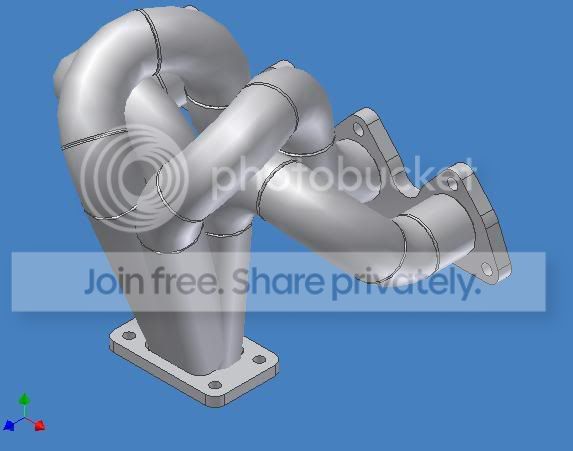
are you talking about what i posted the full race style.. if thats what you where looking for i made the model with a program called z-modeler witch is just a 3d modeling program not a cad. http://www.zmodeler2.com


Joined: Jan 2003
Posts: 851
Likes: 0
From: Phoenix, AZ, U.S.
Re: who has the program to desgin manifold??? some one had just cant find it (gldndrgn14)
<TABLE WIDTH="90%" CELLSPACING=0 CELLPADDING=0 ALIGN=CENTER><TR><TD>Quote, originally posted by gldndrgn14 »</TD></TR><TR><TD CLASS="quote">
umm. how do we download it for windows? i been looking for 1 but dont really want to pay the price for them. haha there is also another 1 that you can play with its http://www.emachineshop.com</TD></TR></TABLE>
I’ve been playing with that this for 2 or 3 hours now. Its fun as hell. But im getting pissed about not being able to edit line from other views. Plus I cant save the 3D images I made. O well its fun. I would like to play with a better program.
-Aaron
umm. how do we download it for windows? i been looking for 1 but dont really want to pay the price for them. haha there is also another 1 that you can play with its http://www.emachineshop.com</TD></TR></TABLE>
I’ve been playing with that this for 2 or 3 hours now. Its fun as hell. But im getting pissed about not being able to edit line from other views. Plus I cant save the 3D images I made. O well its fun. I would like to play with a better program.
-Aaron


Trial User
Joined: Aug 2000
Posts: 396
Likes: 0
From: Madison, WI, USA
Re: who has the program to desgin manifold??? some one had just cant find it (MikeGRIS)
<TABLE WIDTH="90%" CELLSPACING=0 CELLPADDING=0 ALIGN=CENTER><TR><TD>Quote, originally posted by MikeGRIS »</TD></TR><TR><TD CLASS="quote">autodesk inventor, its pretty easy to do 3d, same company as autocad</TD></TR></TABLE>
I have used AutoDesk Inventor and it is a very said example of a parametric solid modeling program. I can’t believe company’s even use it. Inventor and AutoCAD both BLOW ***!!! Pro-E or Solidworks gets my vote!!
I have used AutoDesk Inventor and it is a very said example of a parametric solid modeling program. I can’t believe company’s even use it. Inventor and AutoCAD both BLOW ***!!! Pro-E or Solidworks gets my vote!!

Honda-Tech Member
Joined: Nov 2003
Posts: 5,986
Likes: 2
From: Kitchener, Ontario, CANADA
I have used inventor and solidworks... i doubt anyone just trying out a 3d modeling program for the first time is going to suffer with one or the other.
I suggest you get wha tyou can find - either solidworks or inventor.
I suggest you get wha tyou can find - either solidworks or inventor.

Member
Joined: Feb 2004
Posts: 2,451
Likes: 1
From: Pearl City, HI, USA
Re: (2point2)
Solidworks.

Easy precise input. (The entire kernal of the program is roughing in sketches and then defining exact dimensions) Easy to set up complex assemblies. Built-in physics modeling including finite element analysis. Can calculate centers of mass, stress risers, volumes of complex shapes and pipe flow. You can even define components as a formula that automatically conforms to changes in design.

No surface rendering, so you cannot make your new manifold look bling in chrome.
Inventor
Can render surfaces easily. Very pretty output.
Precise input is secondary to the program. Inventor is only a surface modeling program, which means no physics, modeling, or finite element analysis.
Easy precise input. (The entire kernal of the program is roughing in sketches and then defining exact dimensions) Easy to set up complex assemblies. Built-in physics modeling including finite element analysis. Can calculate centers of mass, stress risers, volumes of complex shapes and pipe flow. You can even define components as a formula that automatically conforms to changes in design.
No surface rendering, so you cannot make your new manifold look bling in chrome.
Inventor
Can render surfaces easily. Very pretty output.
Precise input is secondary to the program. Inventor is only a surface modeling program, which means no physics, modeling, or finite element analysis.

Junior Member
Joined: Mar 2003
Posts: 638
Likes: 0
From: Highland park, IL, USA
Re: (2point2)
Ok I'm going to give it to everyone here straight. I've used autocad, inventor, and Pro E. Conclusions
Autocad is awsome from finite math. You can get everything well dimentioned. I used auto cad to draw a lot of block and shape parts. What this means is that I could take a tranmission and draw out every part. Do something called section views, and all the engineering stuff that people do. Inventor I used when I competed in the chrysler car building competition back in high school. I used it 2 years straight to actually build the externals of a car. Doors, windows, chairs, tailights, wheels, THE ENTIRE EXTERIOR BODY (took about 1 month of about 1 hour a day) the list goes on. One thing that people didn't mention which is the coolest thing is that you can actually build a part that you can put together with another part. For instance You can build each component of a wheel and hub assembly separtly in it's own space. Save the project. Than assemble the intire wheel and hub asembly and make parts have relational motion to each other. IE: You turn the wheel and the rotor and axle turn in their correct mechanical postion with the correct mechanical movement. Ok so you can do everything you would really need with inventor. What else is cool is that in inventor 9 which I'm not sure most people know is that you can work with tubes. What this means is that Inventor will actually put together the tubing that you will need.
Enjoy this video what will help you guys understand what i mean by tube design:
http://www.autodesk.com/us/inv....html
http://www.autodesk.com/us/inv....html
DSL REQUIRED YO!
So after this is all said and build in cool 3-d space inventor provides you with it's next best feature. Unlike autocad and other cad cam programs. You can actually take the inventor program and inport it into a CNC machineing program. (sometimes, this is kind of sketchy, check to see if the machine will be compatible with the imported file first) But in the case of tubes, this is where inventor shines. In other CAd Cam programs you have to dimention off your drawing and if you want to look at another aspect or view of your object you have to make another drawing for that view at least in 2-d space. I know that autocad can do 3-d I just havn't used it for that purpose becuse years of experience from my teachers has taught me better, that is why I would use inventor if you go the extra dimentional route. With inventor you can actually rotate your object to get the view you want and spec that out competely within a matter of minutes without redrawing a thing. You can make 10 difrenent speced views in the matter of 45 min. Try doing that with cad. Most people can't do what, especally if their new to the program. (I'm not say that if you put in the effort you couldn't do it, just take you somewhere in the ball park of 2-3 hrs. plus since you dimensions, and constraints don't carry over into each view like in inventor, you risk making a boo boo in one of the view which you'll figure out when your tubes come back from welding and something looks wrong.) Ok so if you have any questions further of autocad and inventor ask me. I'll move on to pro E. Which stands for PRO ENGINEER. Which is exactly what it's function is. You build your object in 3-d space, almost like in inventor. But the cool beans come in when you can actually apply load to whatevery you are building. IE: You build a custom door ***, you can then apply a force/load at any point in any direct with any magnitiude and find out what happens to your door ***. So if fat albert decided to scratch his *** with your new *** and applies 160 pound force at the 36.7 degree angle down you can test and see if it will survive the journey. This is important because you want to be able to see structure weakness before a thing gets build, IE roll cages, axles, pistons, head studs. So pro E just helps do all the cool real world testing. Problem is that Pro E is hard as hell to find. I've been looking the web for about 2 years and nothing But you can find some schools that have it in their CAD labs and use it there. You'll just have the hardest time finding one for home use. Ok question me further for any answered questions.
PS I'm writing this before going to school, and I'm not caught up on typos, Sorry.
Autocad is awsome from finite math. You can get everything well dimentioned. I used auto cad to draw a lot of block and shape parts. What this means is that I could take a tranmission and draw out every part. Do something called section views, and all the engineering stuff that people do. Inventor I used when I competed in the chrysler car building competition back in high school. I used it 2 years straight to actually build the externals of a car. Doors, windows, chairs, tailights, wheels, THE ENTIRE EXTERIOR BODY (took about 1 month of about 1 hour a day) the list goes on. One thing that people didn't mention which is the coolest thing is that you can actually build a part that you can put together with another part. For instance You can build each component of a wheel and hub assembly separtly in it's own space. Save the project. Than assemble the intire wheel and hub asembly and make parts have relational motion to each other. IE: You turn the wheel and the rotor and axle turn in their correct mechanical postion with the correct mechanical movement. Ok so you can do everything you would really need with inventor. What else is cool is that in inventor 9 which I'm not sure most people know is that you can work with tubes. What this means is that Inventor will actually put together the tubing that you will need.
Enjoy this video what will help you guys understand what i mean by tube design:
http://www.autodesk.com/us/inv....html
http://www.autodesk.com/us/inv....html
DSL REQUIRED YO!
So after this is all said and build in cool 3-d space inventor provides you with it's next best feature. Unlike autocad and other cad cam programs. You can actually take the inventor program and inport it into a CNC machineing program. (sometimes, this is kind of sketchy, check to see if the machine will be compatible with the imported file first) But in the case of tubes, this is where inventor shines. In other CAd Cam programs you have to dimention off your drawing and if you want to look at another aspect or view of your object you have to make another drawing for that view at least in 2-d space. I know that autocad can do 3-d I just havn't used it for that purpose becuse years of experience from my teachers has taught me better, that is why I would use inventor if you go the extra dimentional route. With inventor you can actually rotate your object to get the view you want and spec that out competely within a matter of minutes without redrawing a thing. You can make 10 difrenent speced views in the matter of 45 min. Try doing that with cad. Most people can't do what, especally if their new to the program. (I'm not say that if you put in the effort you couldn't do it, just take you somewhere in the ball park of 2-3 hrs. plus since you dimensions, and constraints don't carry over into each view like in inventor, you risk making a boo boo in one of the view which you'll figure out when your tubes come back from welding and something looks wrong.) Ok so if you have any questions further of autocad and inventor ask me. I'll move on to pro E. Which stands for PRO ENGINEER. Which is exactly what it's function is. You build your object in 3-d space, almost like in inventor. But the cool beans come in when you can actually apply load to whatevery you are building. IE: You build a custom door ***, you can then apply a force/load at any point in any direct with any magnitiude and find out what happens to your door ***. So if fat albert decided to scratch his *** with your new *** and applies 160 pound force at the 36.7 degree angle down you can test and see if it will survive the journey. This is important because you want to be able to see structure weakness before a thing gets build, IE roll cages, axles, pistons, head studs. So pro E just helps do all the cool real world testing. Problem is that Pro E is hard as hell to find. I've been looking the web for about 2 years and nothing
But you can find some schools that have it in their CAD labs and use it there. You'll just have the hardest time finding one for home use. Ok question me further for any answered questions. PS I'm writing this before going to school, and I'm not caught up on typos, Sorry.
Junior Member
Joined: Mar 2003
Posts: 638
Likes: 0
From: Highland park, IL, USA
Re: (nate007is)
Oh yea I have copies of both autocad 2005 and inventor 9 these have NOT been downloaded or hacked in any way. THEY ARE DIRECT FROM AUTOCAD. NO BS. Willing to mail it out for $25 a program if you want both i'll make it an even $40. All i requre is that you get your own Key. WHich I will tell you exactly where to get it and how to use it. not extra charge for that. Ok guys CAD away.